Archive for the ‘New Release’ Category
Thursday, May 20th, 2010
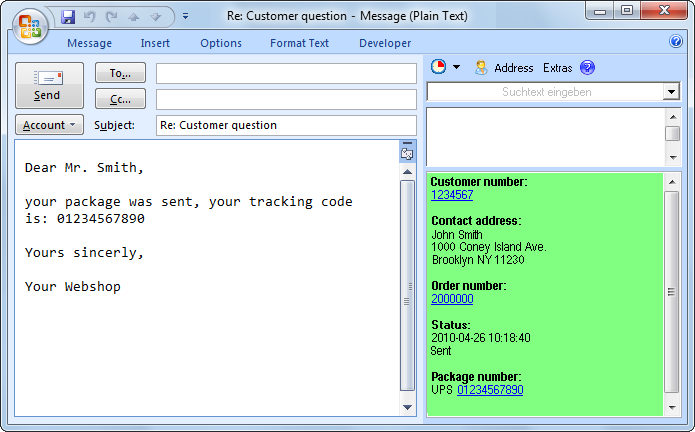 The new ReplyButler 4.00 is available and brings great news. The biggest one  is the support for the plentyMarkets shop system. If you’re running such a shop, you’ll see immediately the key data for each e-mail: customer number, address, order number, status and package number.
The text modules can also use the shop system’s data. Such a text module might for example automatically include the package number of the customer’s most recent order. If that’s not enough there’s a hotkey to bring you from the e-mail or e-mail list to the customer page in your shop administration.
Furthermore the text modules can now include images and add new recipients to the e-mail.
And if you’re using a different CRM / shop system, you can configure the mentioned features yourself manually.
More information about ReplyButler for Outlook and text modules can be found on the homepage, and there’s a new sub-page just for plentyMarkets.
Posted in New Release, ReplyButler | Comments Off on ReplyButler 4.00: Outlook and plentyMarkets
Monday, May 17th, 2010
 The new version 4.0 of Easy2Sync for Outlook is available. While the previous version only had a “half” support for Outlook 2010, this release completely supports the new Microsoft Outlook version. Including the 64 bit mode. This works completely automatically, the user doesn’t have to do anything special. Even the combination of the 64 bit mode with other / older 32 bit Outlook versions is supported.
More information about the program can be found on the Outlook sync page.
Posted in New Release, Outlook, Sync | Comments Off on Synchronizing Outlook 2010
Monday, May 10th, 2010
 We have just published version 3.04 of our Outlook duplicate recognition software 1-Click duplicate delete for Outlook. It’s easy to summarize the changes: We have improved the duplicate recognition algorithms to allow more types of duplicates (especially duplicate e-mails in Outlook) to be automatically recognized.
More info about the program can be found on at Outlook duplicate removal product page.
Posted in Duplicates, New Release, Outlook | Comments Off on Improved Outlook duplicate search
Friday, April 30th, 2010
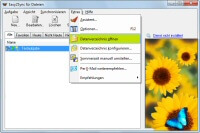 The new version of our file sync tool Easy2Sync for Files is available. Once again it features a number of detail improvements about environment variables, tabs, icons and butterflies.
More information about the program can be found on the program’s file sync homepage.
Posted in Files, New Release, Sync | Comments Off on Easy2Sync for Files 1.39
Sunday, April 11th, 2010
 The Company Logo Designer, our software to design logos quickly and inexpensively is now available as version 2.10. There’s only one things that can be said about the new version: Faster. Especially for complex logos you’ll note the difference because they’re now drawn 3x faster.
More info about the program can be found on the product page of Company Logo Designer.
Posted in Company Logo Designer, New Release | Comments Off on Designing company logo 3x faster
Saturday, April 10th, 2010
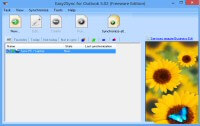 We have published a new release of our Outlook sync software “Easy2Sync for Outlook”. The new release 3.07 includes a number of detail improvements and small bugfixes to make it even easier to synchronize e-mails, calendar items and contacts.
All information and the download can be found on the Outlook sync product page.
Posted in New Release, Outlook, Sync | Comments Off on Easy2Sync for Outlook 3.07
Wednesday, April 7th, 2010
 The new version 3.03 of 1-Click Duplicate Delete for Outlook is available. Now with complete support for Outlook 2010 (including 64 bit), so it’s now possible to remove duplicate e-mails, contacts & calendar items on these systems, too.
Furthermore the program now includes the useful option to compare two objects. This makes it easy to understand the differences between 2 e-mails (contacts, calendar items) that seem to be identical.
More info can be found on the product page of the Outlook duplicate removal tool.
Posted in Duplicates, New Release, Outlook | Comments Off on Searching for Duplicates in Outlook 2010
Friday, April 2nd, 2010
 The new version 1.08 of the TheBest Minimize to Tray is now available. It fixes a small bug with the context menu of the try icons of minimized programs. You can find more information about the program and the download links on the product homepage:Â TheBest Minimize to Tray
Posted in Minimize to Tray, New Release | Comments Off on TheBest Minimize to Tray 1.08
Friday, March 19th, 2010
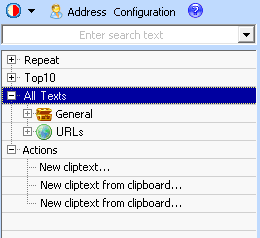 The new version 3.01 of ReplyButler is available and introduces several nice new features.
Now it’s not only possible to set the subject or add attachments using a text module, but you can also add CC or BCC. As a second new feature, you can now automatically include the first line from a text file into your boilerplate text (e.g. for a personal promo code).
Administrating the text modules has become easier, too. Â Now they’re not only available as menu, but the sidebar also shows them in a tree view.
The update and all information about the program can be found on the product page: ReplyButler – Text modules for Outlook.
Posted in New Release, Outlook, ReplyButler | Comments Off on ReplyButler 3.01 – Text modules for Outlook
Monday, March 8th, 2010
The question remains, but the answer was just updated. The new version offers an improved support for netbooks with a low screen resolution and allows to “freeze” the list.
If you’re wondering what you computer is doing, you can find the answer here.
Posted in Free, New Release | Comments Off on What ‘s my computer doing? 1.01
Sunday, January 24th, 2010
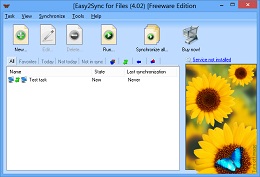 The new version 1.38 of Easy2Sync for Files is available. Apart from several smaller bugfixes and improvements the biggest news are the “Custom steps”. They allow Easy2Sync to run commands (like in batch files) before or after the sync.
More info about the program can be found on the file sync homepage.
Posted in Files, New Release, Sync | Comments Off on Easy2Sync for Files 1.38
Wednesday, January 13th, 2010
The new version 3.06 is available. Just like Easy2Sync for Files, the new version now supports (with Windows 7) the display of progress bar in the task bar.
Furthermore there are a number of detail improvements.
More info about the software can be found on the homepage of the Outlook sync program
Posted in New Release, Outlook, Sync | Comments Off on Outlook Sync software 3.06
Tuesday, December 8th, 2009
The new version 3.02 of 1-Click Duplicate Delete for Outlook is available. The program now supports Outlook 2010 (so far 32-Bit only). Furthermore the new version contains some detail improvements for the name handling when searching for duplicates.
As usual, the update is free for registered users. More infos can be found on the program homepage about removing duplicates in Outlook .
Posted in Duplicates, New Release, Outlook | Comments Off on Outlook duplicate recognition for 2010
Friday, December 4th, 2009
 A new version of Easy2Sync for Files is available. This time, there’s a big number of changes. The dialog “synchronization overview” was completely reworked and is now much clearer. If you want, you can now turn off the butterflies (just like in Easy2Sync for Outlook) in the “View” menu.
Furthermore:
» Progress bar in the taskbar (req. Windows7)
» Installations on USB devices are automatically recognized
» The log file is easier to reach
» It’s easier to use the service menu under Vista/Windows7
As usual, the update is free for all registered users. More info about the software can be found on the file sync homepage.
Posted in Files, New Release, Sync | Comments Off on Easy2Sync for Files 1.37
Wednesday, December 2nd, 2009
 Why is the hard disk LED blinking right now? Why is the Cpu fan starting to spin?
That’s what you often asked yourself? Well, so did we.
That’s why we created a new program. The name says it all: “What’s my computer doing?”
WMCD shows you which programs use your hard disk or your cpu and how often they this. And it even does that in retrospective: If you want to know which program, just HAD accessed your hard disk, WMCD also shows this.
WMMP is still a beta, so we’d happy to get your feedback. The program is free and can be downloaded here: What’s my computer doing?
Posted in Beta, Free, New Release | Comments Off on What’s my computer doing? [Beta]
