New look
Saturday, July 19th, 2008Hi, I’m test-running a new look, the “Baltimore” photo theme. Do you like it?
Hi, I’m test-running a new look, the “Baltimore” photo theme. Do you like it?
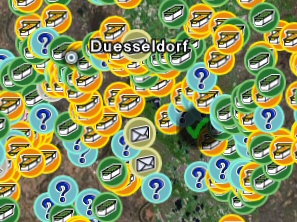
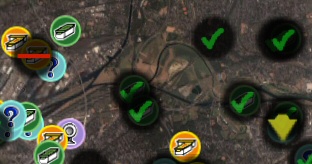
The new version has a great new feature: It can move solve riddle (“unknown”) caches to their real location (instead of the usual dummy location). This is just great for planing trips, ’cause you can see in Google Earth where the box *really* is located.
To use this feature, you have to create a simple text file (for example with the Windows text editor “Notepad”). Each line contains the GC-Number and the North and East or West coords, separated by semicolons. For example “GC1234;N49 12.345;W002 12.345″. Please note that this coordinate format is mandatory. GoogleEarthTweaker does not support other formats here, sorry. The next and final step is to simple enter the path and filename into the respective edit box in the dialog (or use the [...] button to select the file). That’s all. The file can contain as many lines/caches as you can solve.
Enjoy your caching trips!
(Oh, by the way: The moved riddle caches will be marked with a red circle arround the cache in Google Earth. This way you know, that this icon showsreal box coordinates.)
You can download the latest version here.
An off-topic post once again…
I still got 2 WiFi scratch cards here, which I won’t be needing any more. Each for 120 minutes internet access on the Dhiraagu net. So, if you need them, here you are:
UserID C001929, Password LHNDE6
UserID C001928, Password OOCAP5
(Please don’t use them just for the heck of it. They’ll get void 5 days after the first login.)
Happy new year and a great 2008!
Yeah, off-topic, I know. But I like my Lifebook and changed the hard disk today and had a hard time finding a how-to for this. Fujitsu-Siemens doesn’t bother to tell you.
So here’s how to.
Before you start:
Step1: Remove the battery and press the power button for a few seconds to remove any remaining energy.
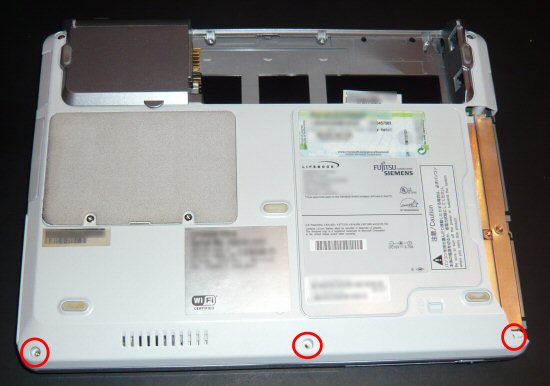
Step2: Turn the Laptop around and remove the 3 screws at the front.
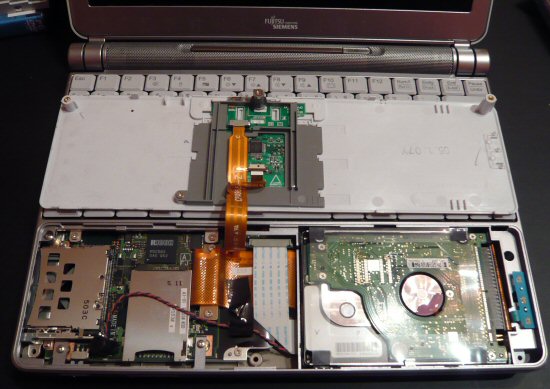
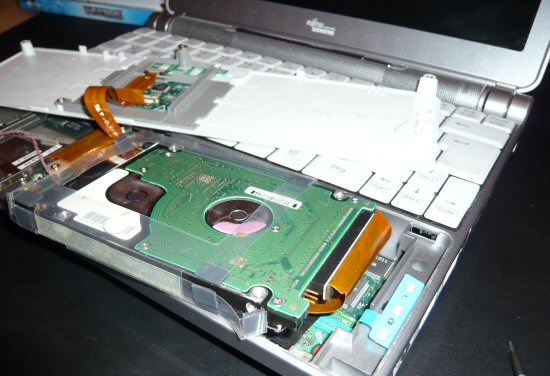
Step3:Turn the notebook around again and carefully pry open the wrist-rest. Don’t pull it away too strong, the touch-pad is still connected with some cables!
Step4: You can see the harddisk at the front right. It’s only held by the ATA cable. Carefully pull it out and exchange the disk. Don’t damage the HD pins, or you won’t be able to revert back in case of problems.
That’s it. Oh by the way: Both Easy2Sync for Files and Easy2Sync for Outlook have “Copy” modes that can be used for a backup. (Not so off-topic after all
Have a merry Christmas!
A new version of my Freeware tool to convert Geocaching.com GPX files to GoogleEarth KML files (and make the icons look nicer and filter your find and and and) has just gone online.

The new release simply fixes a bug that could happen with coordinates that have only zeros after the degree sign.
You can find GoogleEarthTweaker on the Download page.
A new Version (1.06) of GoogleEarthTweaker has just been released.
With this program you can convert Geocache GPX files to make them look “nice” in GoogleEarth:
You can get the latest version here (free): Download
Is Berlin too far away for you? You can still visit it now, with GoogleEarth. As Golem reports, there’s quite a lot of 3d data available that can be viewed in Google’s software. Quite amazing.
You can use our Freeware GoogleEarthTweaker to view Geocaches as nice icons in GoogleEarth (GPX files from a geocaching.com premium account are required). When you convert the files with GET, you may notice that some custom icons appear. GET auto-detects some special cache types:
Church caches:
![]()
TB Hotels:
![]()
Train stations:
![]()
Highway caches:
![]()
Night caches:
![]()
No, not Easy2Sync this time. Most people probably won’t even know WordPress but in fact you’re using it right now. It’s a blogging system, quite popular. And because it’s popular, some people may try to attack systems running it. And that’s why there is the second update within a few weeks. Well, that seems to be the world we live in nowadays…
If you’re into Geocaching, you might be interested in GoogleEarthTweaker, a Freeware program that I wrote. It allows you to convert GPX files (pocket queries) into nicer KML files with nicer icons. To do that, simply drag the GPX file (or the zipped GPX file) into the main dialog of GoogleEarthTweaker.
There are however some tricks:
Hope you had a great 2006.
No words required, I think…
A bit off-topic in this blog, but the Opera browser is a favorite of mine. The new version (Golem, PC Welt)contains a phishing filter, which (sadly) is important nowadays.
BTW: Opera stores its bookmarks in a file named opera6.adr. If you have Opera running on multiple computers, you can use the Freeware Edition of Easy2Sync for Files, to synchronize that file. There’s even a special assistant for synchronizing individual files.