January 13th, 2010
 The new version 3.06 is available. Just like Easy2Sync for Files, the new version now supports (with Windows 7) the display of progress bar in the task bar.
Furthermore there are a number of detail improvements.
More info about the software can be found on the homepage of the Outlook sync program
Posted in New Release, Outlook, Sync | Comments Off on Outlook Sync software 3.06
January 7th, 2010
 The new version 3.00 of our Outlook text module software “ReplyButler” is out. And it include important new features. Cliptexts can now automatically be inserted when they’re relevant. This allows you to answer e-mails automatically.
This works great, especially for topics where certain works (e.g. error codes) always ask for a certain answer. All you have to do is to enable the “insert automatically” feature for the cliptext.
If you now reply to an e-mail that contains these words, ReplyButler will automatically:
- Recognize the language
- Write the greeting phrase with the right (first or last) name
- Insert the text module in the right language.
- Append the matching greeting phrase
So the e-mail was answered is ready to send even before you typed a single character.
Apart from that, the version now supports Outlook 2010 (32-bit) and has the “Send later” Option to send the mail on the next working day at 9:00 am.
More info about ReplyButler and the ready-made boilerplate texts for Outlook can be found here.
Posted in Uncategorized | Comments Off on ReplyButler 3.00 – Answer e-mails automatically
December 27th, 2009
The new version 1.07 of TheBest Minimize to Tray is out. The new version includes a few minor fixes and improvements. More info about the program can be found here.
Posted in Duplicates | Comments Off on Minimize any app into the tray
December 8th, 2009
 The new version 3.02 of 1-Click Duplicate Delete for Outlook is available. The program now supports Outlook 2010 (so far 32-Bit only). Furthermore the new version contains some detail improvements for the name handling when searching for duplicates.
As usual, the update is free for registered users. More infos can be found on the program homepage about removing duplicates in Outlook .
Posted in Duplicates, New Release, Outlook | Comments Off on Outlook duplicate recognition for 2010
December 4th, 2009
 A new version of Easy2Sync for Files is available. This time, there’s a big number of changes. The dialog “synchronization overview” was completely reworked and is now much clearer. If you want, you can now turn off the butterflies (just like in Easy2Sync for Outlook) in the “View” menu.
Furthermore:
» Progress bar in the taskbar (req. Windows7)
» Installations on USB devices are automatically recognized
» The log file is easier to reach
» It’s easier to use the service menu under Vista/Windows7
As usual, the update is free for all registered users. More info about the software can be found on the file sync homepage.
Posted in Files, New Release, Sync | Comments Off on Easy2Sync for Files 1.37
December 2nd, 2009
 Why is the hard disk LED blinking right now? Why is the Cpu fan starting to spin?
That’s what you often asked yourself? Well, so did we.
That’s why we created a new program. The name says it all: “What’s my computer doing?”
WMCD shows you which programs use your hard disk or your cpu and how often they this. And it even does that in retrospective: If you want to know which program, just HAD accessed your hard disk, WMCD also shows this.
WMMP is still a beta, so we’d happy to get your feedback. The program is free and can be downloaded here: What’s my computer doing?
Posted in Beta, Free, New Release | Comments Off on What’s my computer doing? [Beta]
November 28th, 2009
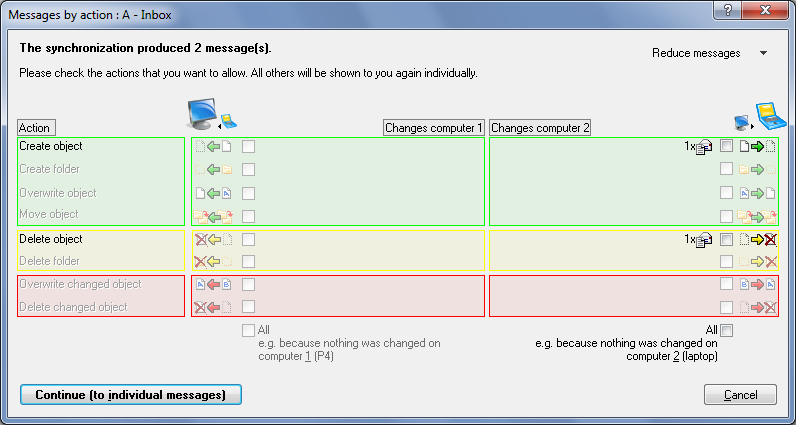
The new version of our Outlook synchronization software Easy2Sync for Outlook is out now. This time with quite a lot of improvements.
The biggest change is the completely reworked “synchronization overview” dialog. Â It now looks a lot nicer and shows much clearer which actions Easy2Sync suggests. (User of Easy2Sync for Files can look forward to the next update: They’ll get the same improvement.)
Furthermore the program is now compatible to Outlook 2010 (so far only 32 bit), it’s easier to install onto an USB stick and the logfile is easier to reach, too.
The update is free for all registered users. More info about the software can be found on the Outlook Sync homepage.
Posted in New Release, Outlook, Sync | Comments Off on Outlook Sync 3.05
November 13th, 2009
The new version 3.01 of our Outlook duplicate search is available. The new version improves several details and now uses the nicer new Windows user interface. As always the update is free for registered users. More information about the software can be found on the homepage of the Outlook duplicate search tool.
Posted in Duplicates, New Release, Outlook | Comments Off on Outlook duplicate search 3.01
October 12th, 2009
The new version 3.04 of our Outlook sync software is out. It features lots of small detail improvements and improved support for Exchange servers, services under Vista and can now handle corrupted PST files better.
Die biggest and (from Easy2Sync perspective) almost historic change: You can now turn off the butterflies (Menu: View).
The program includes the butterflies since the very first release (even since the very first release of Easy2Sync for Files). Because of their symmetry, they were chosen as symbol of the synchronization. But if you want, you can now turn them off to get a “plain” user interface.
As always the update is free for all registered customers. More info about the program is available on the Outlook sync page.
Posted in New Release, Outlook, Sync | Comments Off on Easy2Sync for Outlook 3.04
October 11th, 2009
The new version 3.00 of 1-Click Duplicate Delete for Outlook is available. And most of all it’s:
Faster!
The increase in speed varies with hardware and data, we measured improvements between 2,5x and 9x faster. (In average of our test case 5,75x faster.)
And that with the great and secure duplicate recognition: We didn’t do it at the expense of security, no comparisons were skipped. So, you’ll get the same results as from the previous, award-winning versions. Just faster. 😉
As always the update is free for registered customers. More information about the Outlook duplicate search tool can be found here.
Posted in Duplicates, New Release, Outlook | Comments Off on Outlook duplicate search – 5x faster
September 7th, 2009
We’ve just published version 2.01 of 1-Click Duplicate Delete for Outlook. The new version brings some minor bug fixes and small improvements. For example the merging of duplicate contacts was improved.
As always the update is free for registered users. More info about the program can be found on the info page for the Outlook duplicate software.
Posted in Duplicates, New Release, Outlook | Comments Off on New version of the Outlook duplicate search tool
August 13th, 2009
A quick update for Easy2Sync for Files: Version 1.36. In the previous version using the “safe copy” option could lead to the stopping of the entire task. This is fixed now. In general this options is useful for safely copying files over unstable networks.
Furthermore a problem with the lock files was fixed (they’re useful if you run competing syncs on multiple computers).
As always the update is free for our registered customers. For more info about the product, please refer to the File sync page.
Posted in Files, New Release, Sync | Comments Off on Update: File sync version 1.36
August 3rd, 2009
We’ve just released Easy2Sync for Files 1.35. There are two major changes in the program. First, the update includes an improved support for unreliable networks. Wireless, dial-up, VPN, etc. Â Easy2Sync is now much better at detecting broken connections and incorrect server responses to protect your data.
The second change is a reworked user interface with new icons. Hope you like. 😉
The update is (as always) free for registered users. For more info please refer to the file sync page.
Posted in Files, New Release, Sync | Comments Off on New file sync version 1.35
July 21st, 2009
We’ve just published the new version 3.02 of Easy2Sync for Outlook. There are too many detail improvements to list them here, so I’ll just explain the two most important ones.
From now one, Easy2Sync will not delete an item that was deleted on the other computer, but move it into the “Deleted Items” folder instead to make an undo possible. Furthermore we reworked the icons in the program to match the current style (16 colors wasn’t  up-to-date any more).
As always the update is free for registered users. For more info, please refer to product page of our Outlook sync tool.
Posted in New Release, Outlook, Sync | Comments Off on Outlook sync with more security
July 14th, 2009
 One of the many small features that Easy2Sync for Files has is that it supports you when searching for the right folder. The folder where your browser stores your bookmarks, for example.
Simply create a new task in Easy2Sync and instead of entering a folder, click on the small black triangle on the right. The combo box will open and present you (among other things) a choice of your browser bookmarks. Simply choose yours and repeat this for the second computer. This works with the Freeware Edition for the browsers Opera and Firefox. (IE users will need the Home or Business Edition because of the subfolders.)
Posted in Files, Free, Sync, Trick | Comments Off on Synchronizing your browser bookmarks for free
