July 8th, 2009
 Not long ago we released the previous version of 1-Click Duplicate Delete for Outlook. But a lot of things were done here in the meantime. The new release includes a greatly improved duplicate recognition engine and some small bug fixes.
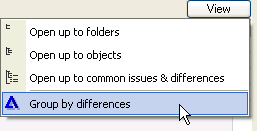
The big news however is the new “group by differences” feature. Â If you have a lot of duplicates, it allows you to quickly see which ones have only minor differences and which ones have more important ones.
And that’s how it looks like. The new blue delta sign parts the duplicates from the folder into three groups:
- Differences for “Creation, Last Modification”
- Differences for “Modification”
- No differences
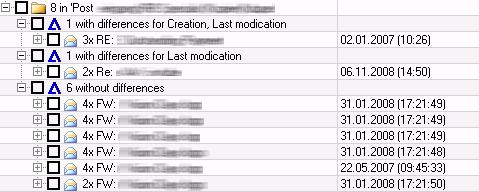
For this example with 8 duplicates, this isn’t a big deal. But if you have a few hundred duplicates, then it makes all the difference, because you don’t have to look into the details any more.
For more info about the product please visit the Outlook Duplicate Delete homepage.
Posted in Duplicates, New Release, Outlook | Comments Off on Delete Outlook Duplicates with version 2.0
June 25th, 2009
We’ve released the version 1.05 of our file duplicate search tool. The old version could crash when encountering errors in the file system. That is fixed with the new version.
For more information, please refer to the info page of our file duplicate search program. As usual, the update is free for registered users.
Posted in Duplicates, Files | Comments Off on Improved file duplicate search
June 24th, 2009
The new ReplyButler version 2.06Â is out. We’ve made a number of changes. The biggest is probably a simple and yet powerful support for case numbers (an important feature for Outlook helpdesks). The software can append a unique case number to the subject of any e-mail that you answer. You can choose the format of the case number yourself.
Furthermore we made a number of smaller improvements like improved name recognition, faster mail handling, improved filter rules and fixes for text module handling.
For more info about the product, please refer to the ReplyButler Homepage. For registered users the update is (as always) free.
Posted in New Release, ReplyButler | Comments Off on ReplyButler 2.06 for simple helpdesks
June 22nd, 2009
The new version 1.23 for our Outlook dedupe software is our. The changes are simple: We’ve improved the recognition of duplicate e-mails and contacts for some special cases.
As always the update is free for registered users. For more info about the program, please refer to the Outlook duplicate delete page.
Posted in Duplicates, New Release, Outlook | Comments Off on Improved duplicate recognition for Outlook
May 28th, 2009
ReplyButler, our tool for boilerplate texts in Outlook makes another step towards helpdesk solutions. The next release will be able to add unique case numbers (to the subject of the e-mails).
More info here about ReplyButler, boilerplate texts and Outlook.
Posted in Preview, ReplyButler | Comments Off on ReplyButler soon with case-numbers
May 20th, 2009
I will take some more time until Windows 7 is published. Of course we couldn’t wait that long and tried the current beta version from Microsoft. The pleasing result: All our programs are already compatible with Windows 7.
Posted in Uncategorized | Comments Off on Ready for Windows 7
May 18th, 2009
The new version 1.06 is here, with two interesting improvements. We’ve improved capatibility with Outlook when minimizing it to the tray. And you can now define a hotkey to minimize apps to the system tray.
You can find more info about the  program on the TheBest Minimize to Tray homepage.
Posted in Minimize to Tray, New Release | Comments Off on Minimize everything to tray (New version)
May 12th, 2009
The new version 1.34 of our file sync tool is out. The major change are the two new task types:
- Copy files always
- Delete files
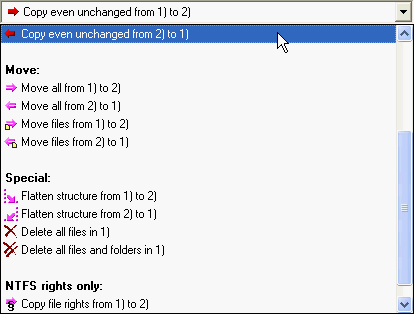
The first one allows you copy files even when they seem be unchanged. This is great for creating backups of TrueCrypt containers because they change neither size nor date, when their contents are changed.
The second task task makes it easier to automatically deleted unwanted files. The nice twist here is that you can combine it Easy2Sync’s filter options for file and path names and file age.
You can find more information about Easy2Sync for Files on the file sync page.
Posted in Files, New Release, Sync | Comments Off on Easy2Sync for Files – New version 1.34
May 6th, 2009
We’ve just published the new version 3.01 of our Outlook synchronisation software. The new release contains some minor improvements and fixes, for example when synchronizing an Exchange account with a PST file.
More info about Easy2Sync for Outlook can be found on our Outlook sync page.
Posted in New Release, Outlook, Sync | Comments Off on New Easy2Sync for Outlook version
May 4th, 2009
 We’ve just released version 1.22 of our software 1-Click Duplicate Delete for Outlook. The new release feature two important improvements. Â On the one hand it can now recognize duplicate e-mails even in they have a slightly modified content from the way that they were transferred. Since customers usually don’t notice these changes, we’ve made the software ignore them, too. 😉
The second change is important, too. A crash that could occur when scanning bad pst files for duplicates is now fixed.
The updates is (like always) free for our registered customers. You can find more on our Outlook duplicate search page.
Posted in Duplicates, New Release, Outlook | Comments Off on Improved Outlook Duplicate search 1.22
May 2nd, 2009
Both Easy2Sync for Files and Easy2Sync for Outlook offer the option to summarize multiple tasks (via file > new) into a “task collection”. This is very useful if you wan to synchronize multiple folder trees or PST files in a row. Furthermore you can (via the menu ‘View’) hide all tasks from the main list that are already member of a task collection. This makes the list shorter and easier to read.
Only downside: Sometimes you want to run just a single task of the task collection. But you can’t do that if the task is hidden.
The trick here is very simple and very useful: Use the right mouse button to click on the task. The context menu contains not only the usual commands (like ‘Edit’), but also all tasks that are a member of that task collection. Now one click is enough to run the specified sync task.
More info: Easy2Sync for Files, Easy2Sync for Outlook
Posted in Files, Outlook, Sync, Trick | Comments Off on Tip: Rapid access for task collections
April 15th, 2009
 Version 2.0 was already 7x faster than the previous releases. With the new version 3.0 we’ve increased the speed yet again. Especially for large volumes of e-mails and slow network connections the new release can show another dramatic speed increase of up to factor 7.
Furthermore we’ve improved the new-task-wizard for some special cases. It’s now easier than ever before to create a file Outlook sync task and configure Easy2Sync for Outlook.
To download and for more information please visit Easy2Sync for Outlook’s sync homepage.
Posted in New Release, Outlook, Sync | Comments Off on Sync 7x faster (again) with Easy2Sync for Outlook 3.0
April 2nd, 2009
 We’ve just released the version 1.21 of 1-Click duplicate delete for Outlook. The new release contains an improved recognition for similar contacts. This allows the software to recognize Outlook duplicates in more cases so that you don’t have to manually specify what you consider a duplicate.
As always, updates are free for registered users. You can find more information on the page for the Outlook duplicate search software.
Posted in Duplicates, New Release, Outlook | Comments Off on Improved Outlook duplicate contact search 1.21
March 12th, 2009
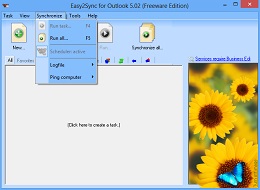 We’ve just released version 2.08 of Easy2Sync for Outlook, our synchronization solution for Outlook. No new features this time, just a big bunch of minor changes and bug fixes. Mostly for new users and for setting up new tasks to make it easier to use Easy2Sync.
The update is as always free for registered users. For more information about Easy2Sync for Outlook please refer to the Outlook sync software page.
Posted in New Release, Outlook, Sync | Comments Off on New release 2.08 of our Outlook Sync software
March 10th, 2009
We’ve just released ReplyButler 2.05. Â The updates contains several small bug fixes and minor improvements.For example you can now remove items of the Top 10 list by right-clicking them.
For more, please refer to the ReplyButler Homepage.
Posted in New Release, Outlook, ReplyButler | Comments Off on Better Outlook boilerplate texts with RB 2.05
