December 18th, 2007
Next release of our text module software will include a nifty new feature, requested by several customers. Hotkeys will be added to the next release of ReplyButler. They’ll not only allow you to call specialized dialogs like the options, the context or the addressing menu. (As it can be seen in the screenshot.)
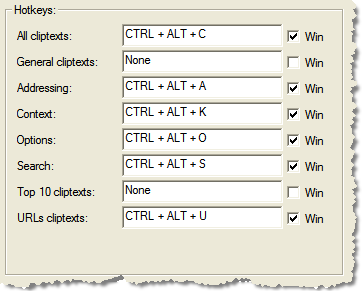
But they’ll also be available as shortcut to any boilerplate or boilerplate folder that you have in your text collection and that you often use to answer your support e-mails. If you don’t insert a text in the text module dialog, you can still use the shortcut to change the subject line to a predefined subject or add attachments to the e-mail.
If you already want to give the current version a try have a look at the replybutler page.
Posted in Add-In, Outlook, Preview, ReplyButler | Comments Off on Preview: Hotkeys and boilerplates
December 18th, 2007
Version 1.11 of our duplicate removal software is now out. It now support different capitalization, recurring tasks and some other improvements and compatibility fixes.
Here’s an image from the (optional) confirmation dialogs:

Click here to get the latest version.
Posted in Add-In, Duplicates, Outlook | Comments Off on New Version: 1.11 of 1-Click Duplicate Delete for Outlook
December 15th, 2007
Posted in Company Logo Designer | Comments Off on Last day of our special!
December 14th, 2007
As Golem notes Buffalo is going to sell a USB stick with the tiny capacity of 32 GB. (If you want to test your japanese knowledge, the original page is here. 😉
Being always fascinated by how much data you can store on small media (not only for my Outlook and File Sync programs) I couldn’t pass on this note. 32 Gig would be enough to store about 24 days of music (at 128 kbit/s). Or (talking about e-mails again) 16 full-blown PST-files (if you still working with the old Outlook format with the size limit ;-).
Posted in News | Comments Off on 32GB USB Stick! :-O
December 9th, 2007
Another release of Easy2Sync for Outlook is out, always the update is free for registered customers. (Even if you’re the one who bought the first copy of version 1.00 – Thank you by the way 😉
The new release has 3 major changes:
- It’s faster
- It supports moving e-mails
- It supports merging folder
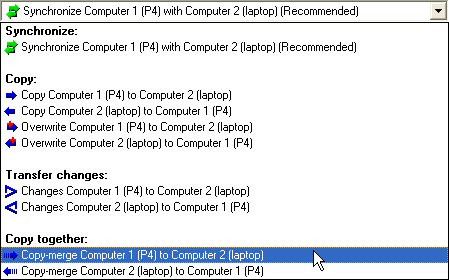
In the new few blogs I’ll show you the details about these new task types, what you can do with them and how to handle them.
To get an idea, what Easy2Sync is all about please try the Freeware Edition.
Posted in New Release, Outlook, Sync | Comments Off on Easy2Sync for Outlook 1.26: Sync, Merge, Move
December 4th, 2007
Synchronizing huge amounts of data at remote locations can be difficult. VPN or web services aren’t exactly know for their speed, so ou might want to use a USB hard disk to synchronize and then move it to the second location for another sync. Western Digital is offering a 320 GB hard disk which should be enough for HUGE amounts of data (for file or Outlook sync).
Nice detail: The hard disk gets its power from the USB cable, so you won’t need an extra power connection.
Details and a foto are available on Golem.de.
Posted in News | Comments Off on Sync @ 320 GB
December 4th, 2007
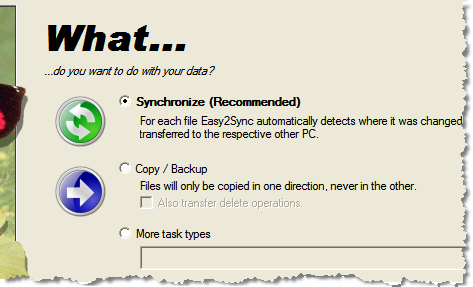
A new release of our file synchronization software is out: Easy2Sync for Files 1.25. If you plan to set up new sync tasks, the new release it a must. A new wizard makes the configuration so much easier. It support file synchronization, copy/back modes and several other task types. Even a synchronization with an FTP server is supported by the wizard.
Here’s the sync task type page:
To find out more about the new Easy2Sync version or download the Freeware Edition, please visit the product page.
Posted in Files, New Release | Comments Off on Easy2Sync for Files 1.25
November 28th, 2007
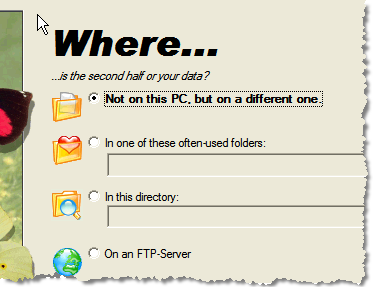
If synchronizing your files has been too difficult with any software so far, you should try the beta version of Easy2Sync for Files. The “New task” assistant has undergone a major rework to make it very easy to set up a synchronization task.
Especially sharing a folder can be difficult on a Windows PC, but it’s always necessary for a file synchronization. The new release makes this a lot easier by proving a wizard that helps you choose and share the right folder.
If you want to have a look at the latest version, visit the Easy2Sync for Files Homepage.
Posted in Beta, Files, Sync | Comments Off on Beta: Easy2Sync for Files 1.25
November 27th, 2007
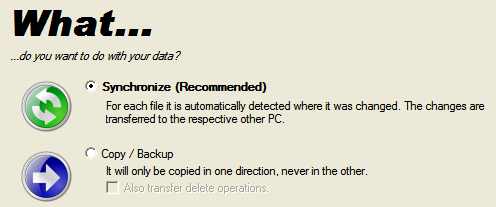
The next release of Easy2Sync for Files will feature a new Wizard to make setting up a new task much easier.
Here’s a small appetizer of how it will look like:
The new version will be released soon, if you don’t want to wait with your file synch projects, you can try the Freeware Edition of the current version right now: Easy2Sync for Files.
Posted in Files, Preview, Sync | Comments Off on Preview: New file synchronization Wizard
November 26th, 2007
Text modules can be assigned icons in ReplyButler. This helps you organize (and recognize) your canned texts. And here’s a glimpse on how that will look like in the next release:
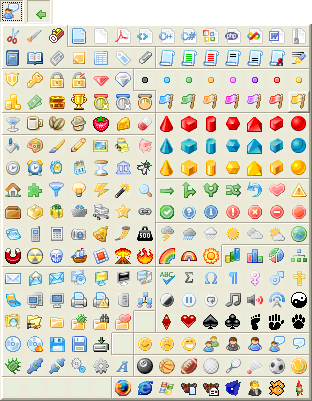
Quite a lot eh? We’ve added quite a few and reorganized the old icons into some new groups. So, if you want to send a customer a compressed document and have a text module explaining how to handle such a file, simply assign the matching icon (in the topright corner) to that text and it will be easier for you to find it again.
Click here to have a look at the current version of our text module software ReplyButler.
Posted in Add-In, Outlook, Preview, ReplyButler | Comments Off on Preview/ReplyButler: New text module icons
November 25th, 2007
Opera is a great (free) browser. If you like it, too, you may want to synchronize your bookmarks between different computers. Since Opera stores all bookmarks in a single file, you can easily synchronize that with the Freeware Edition of Easy2Sync for Files. Forever, if you like, as the Freeware Edition doesn’t contian a time limit.
Easy2Sync has a special assistant for task that synchronize just one file:
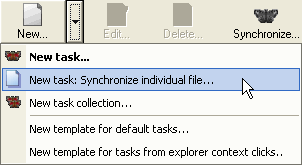
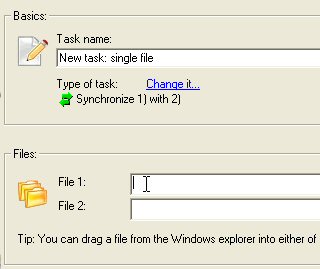
By default Opera’s bookmark file is named opera6.adr and is stored in C:\Program files\Opera\Profile (even though the path may be different on your system). To set up the task just drag the file from the local and the (shared) remote path into this dialog. When synchronzing, please note that Opera modifies the file every time you use a bookmark, so it’s best to synchronize often. 😉
Give it a try with our Freeware Edition of Easy2Sync for Files.
Posted in Files, Free, Sync, Trick | Comments Off on How to synchronize your Opera Bookmarks for free
November 22nd, 2007
In the past weeks we’ve been collecting boilerplates (text modules) that are useful for doing Software Support and answering customer e-mails.
Now, we’ve published them and you can download our collection of 55 text modules that can be used directly in Outlook, conveniently organized in 18 folders.
So, even if ReplyButler isn’t Freeware, these text modules are. And you can even use them in ReplyButler after the ReplyButler’s 30-day trial period has expired.
Dowload the text modules for Outlook.
Posted in Free, ReplyButler | Comments Off on Free boilerplates for Software Support
November 11th, 2007
In the next release, Easy2Sync for Outlook will contain 2 new task types. Can’t give you the details yet 😉 but the new types are variations of the classic “copy” type. Here’s how it will look like:
If you want, you can try the copy task type in the Freeware Edition right now.
Posted in Outlook, Preview, Sync | Comments Off on Preview: New task type to copy your Outlook data
November 8th, 2007
Easy2Sync for Files offers plenty of configuration options. And if you’re the tech guy who did the job of configuration it for somebody else you may want to protect your work against accidental misconfiguration by the user.
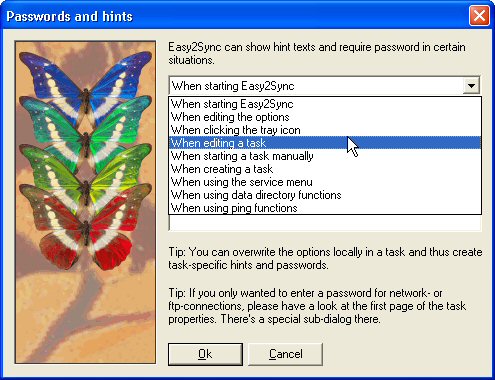
This can be done easily with Easy2Sync. You can protect the tasks (which contain the file sync information), the options, the service configuration, the start of the sync software or of a sync task. Well, practically everything. And you can display an information message (like “don’t do this yourself, call us instead”) and / or demand a password.
Want to have a test drive? Then try our Freeware Edition. It fully supports the passwords feature.
Posted in Files, Sync, Trick | Comments Off on Protect your file sync configuration
November 5th, 2007
I spent this weekend at the European Software Conference in Cologne and heard quite a lot of interesting things about Software. So watch out some changes in the future. 😉
By the way, not everything was absolutely serious deadly serious. Here’s Marck Pearlstone and Michael Lehman perfoming “Image just one browser”.

By the way, there are already some changes to see on our site. We’ve change the ReplyButler (our Outlook boilerplate add-in) main page. Here are the new and the old versions. If you’d like to comment, please send us an e-mail. (BTW: These links may be outdated in future, when we’ve finished our testing. In that case, simply use the ReplyButler homepage.)
Posted in News | Comments Off on Back from the ESWC