October 26th, 2007
A new version of our duplicate removal software is now out. It contains some bugfixes and smaller improvements. For example the merging of contacts that already have been merged on previous scans was now improved.

You can get the latest version here.
Posted in Add-In, Duplicates, New Release, Outlook | Comments Off on New Version: 1.10 of our Outlook duplicate removal software
October 21st, 2007
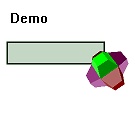
For all the techies out there, we have a nice bit: Our technology logo pack. It’s a free add-on for the Company Logo Designer our simple-to-use tool to create your own custom logos.
This Logo Pack with 25 technology-style logos is completely free and can even be used with the Demo Version of the CompanyLogoDesigner.
Here are some logo design samples:



You can download the logo pack here. The Company Logo Designer is also availble for download.
Posted in Company Logo Designer, Free, Useful | Comments Off on Freebee of the week: Free Technology Logo pack
October 14th, 2007
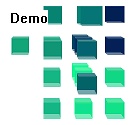
The Company Logo Designer makes it easy to design a logo, but for a professional logo, a template is always a good starting point.
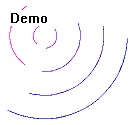
We’re giving you 25 free templates. No purchase or registration required, just download and install. All templates can be modified, not only in color, but also the logo itself.
Here are some logo samples:


You can download the Logo pack here. The Company Logo Designer main program download ist here.
Posted in Company Logo Designer, Free, Useful | Comments Off on Freebee of the week: Free professional logo packs
October 11th, 2007
A new release for our Outlook helpdesk software is available: ReplyButler. 1.30.

The new release has a lot of new features and improvements:
- Text modules can now contain e-mail attachments
- The addressing phrases can be quickly reconfigured
- There more icons available
- It’s faster
You can get the latest release on the Download page.
Posted in Add-In, New Release, Outlook, ReplyButler | Comments Off on ReplyButler 1.30: Outlook text modules with attachments
October 10th, 2007
Our software ReplyButler is able to store (very complex) text modules in form of text module library. Each library equals a file on your harddisk.
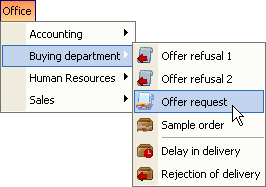
If you’re using ReplyButler in a team environment you may know that you can store the library files on a network drive. ReplyButler can handle this and share access between the instances running.
But what if you’re using a laptop that’s not always connected to the network? No problem you can use your Outlook text modules there, too. Simply use Easy2Sync for Files to synchronize the .ClipTextLib files between the computers. If you all of your text module libraries are stored in the same folder on your harddisk (would be a good idea anyway), then even the Freeware Edition of Easy2Sync for Files can do this.
Posted in Files, Outlook, ReplyButler, Sync, Trick | Comments Off on Trick: Synchronize your Text modules with Easy2Sync
October 1st, 2007
Happy Birthday, Easy2Sync for Outlook got another release older. 😉
The new version brings a new feature, that you may already know from Easy2Sync for Files. If you’re synchronizing a PST files that’s stored on an USB drive then the drive letter can become a problem. Will can change the drive letter for device when you re-plug it.
Because the sync of an USB device is an important issue we’ve added support for this long ago. But specifying the right parameters wasn’t really easy. We changed that. Now simply enter the path. Easy2Sync for Outlook will recognize the USB status and suggest the right things.
Give it a try and synchronize your Outlook e-mails.
Posted in New Release, Outlook, Sync | Comments Off on New Outlook sync software Release: 1.25
September 27th, 2007
So far, our canned text software for Outlook, ReplyButler, was represented by a demo video and some images in the blog. Time for an improvent, so we added a nice screenshot gallery.
Now there are 20 screenshots showing the options, the menu, the text module dialog and the canned text library.
Here’s a sample:

To see more, please visit the Screenshot pages.
Posted in Add-In, Outlook, ReplyButler | Comments Off on New screenshots of our Canned Text Software
September 24th, 2007
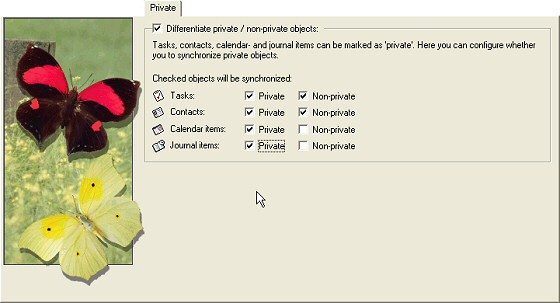
Outlook supports a “private” flag for contacts, calendar items and other items. Depending on your situation you might want to synchronize only private or non-private items. Or both?
No matter which combination you want, Easy2Sync for Outlook supports it. You can simply decide (for each object type indepently) if you want to synchronize or not. Transfer non-private contacts? Or only the private calendar items? Anything goes.
See for yourself:
Click here to try it and download the Freeware Edition.
Posted in Outlook, Sync, Trick | Comments Off on Synchronizing private contacts
September 23rd, 2007
Yes, this week we’ll give away three discount codes for a 20% discount on any of our products (for example Easy2Sync for Outlook or 1-Click-Duplicate-Delete for Outlook):
UO4G1R8LIMIT30092007BITSTH-20-ab6aa7d2d20960b0dd7c33ac905f8107
NW4E3K8LIMIT30092007BITSTH-20-2ef0481e72e7e14fe3feebaf1ae4038e
UY9E8F1LIMIT30092007BITSTH-20-32dfbeabca102ff00a86dffab05f11c8
Yes, 20% discount just for reading the Outlook and sync blog 😉
Please note:
- Each is valid only once.
- If one code doesn’t work, bad luck, you’re not the first – so try another.
- If it works, don’t stop the purchase process, because it won’t work another time.
- Discounts can’t be combined
- The discount must be entered on the “Your cart” page.
- Codes are only valid until the end of the month
Enjoy!
Posted in Free | Comments Off on Freebee of the week: 3 discount codes
September 18th, 2007
Another release of Easy2Sync for Files. No new features this time, just some fixes. If you had problems with synchronizing FTP websites or if the task properties took their sweet time appearing on your screen, then the new release is just for you.

Go to the download page.
Posted in Files, New Release, Sync | Comments Off on Synchronize your Files with Version 1.24
September 10th, 2007
The previous releases of Easy2Sync for Files mostly brought detail changes and bug fixes.
Not this one.
This time, there are some really big changes in Easy2Sync for Files. One of the most obvious is the new confirmation assistant. Whenever Easy2Sync wants a confirmation before synchronizing a file it is displayed. And we totally reworked it to make it nicer and clearer:
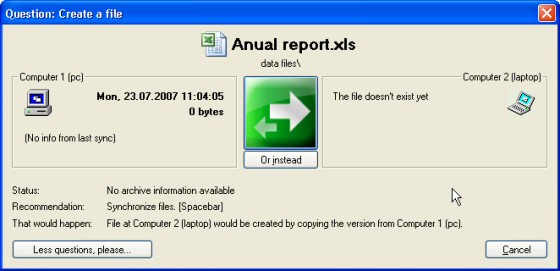
Furthermore the program helps you setting up your synchronization tasks and suggests often used paths for that.
And of course there are some nice new details. You can right-click task collections now to run a single sync task from the collection. And the program helps you specify drive-letter independed USB-paths.
Lots of changes. Want to sync your files? Then get the latest version.
Posted in Files, New Release, Sync | Comments Off on Synchronize your Files with Version 1.23
September 2nd, 2007
Want a modern logo? (Who would say “no” to such a question? 😉 Well, take a look at our latest freebee: The Modern Logo pack. It contains 25 template files which can be used our design software “company logo designer“.
The logos in the packs are just starting points for your design process and allow all kinds of modification. Just give it a try.


Posted in Company Logo Designer, Free, Useful | Comments Off on Freebee of the week: Free Modern Logo templates
August 26th, 2007
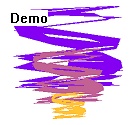
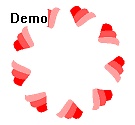
It’s always difficult to find a fresh approach for logo design. If you want a new, innovative logo, it’s time to look at our new logo pack.
This pack contains 25 “.CompanyLogo” files which can be use in our Company Logo Designer. Simply install the CompanyLogoDesigner first and then the logo pack, then you’ll have the new templates available. Give it a try and get the Company Logo Designer.


Posted in Company Logo Designer, Free | Comments Off on Freebee of the week: Free Innovative Logo templates
August 19th, 2007
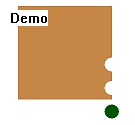
Want an industry-style logo? Well, try the Company Logo Designer and get the free industry logo pack. It contains 25 logo templates to give you a real good start with the design process.
The logo pack is free (you can download it here) and it’s compatible with the Demo Version of the Company Logo Designer.
Here are some examples:



Posted in Company Logo Designer, Free, Useful | Comments Off on Freebee of the week: Industry Logo Pack
August 17th, 2007
Our product Easy2Sync for Outlook is great for synchronizing Outlook data on PC, like contact data stored. But it’s not able to make a backup of cell phone data.
To close this gap, we have a new partner: Synkia

Their service allows it to make backups of your cell phone data (like phone number lists) and even to transfer this data to your new mobile phone.
Posted in News, Sync | Comments Off on New partner: Synkia
