March 15th, 2007
With 1-Click duplicate delete for Outlook it is. But you don’t have to trust us blindly.
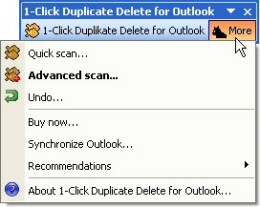
Simply use the advanced mode and you’ll be able to see and to check every delete first:

And if something went wrong, you can simply undo everything:
It doesn’t get any safer than that! Try it now! Download 1-Click Duplicate Delete for Outlook.
Posted in Duplicates, Useful | Comments Off on Is it safe to delete duplicates?
March 12th, 2007
When you’re synchronizing files, you may encounter the problem that the file can’t be synchronized because it’s locked.
Now, there a different levels of file locking. Easy2Sync for Files automatically tries to make the best out of the situation and tries to copy the file whenever possible while detecting and avoiding certain risks in the involved Windows functions. But sometimes that’s not enough. Sometimes files just can’t be copied (and there may be a good reason for that).
So the only thing left is to close the application that’s locking the file. If you know which one that is, you can enter it into the options:
http://itsth.de/img/produkte/en/easy2sync/large/easy2sync_33.jpg
Before running the task, Easy2Sync will check if the application is running and ask you to close it, so that the synchronization can take place. This is useful for example for database applications.
Try it: Download Easy2Sync for Files
Posted in Files, Sync, Trick | Comments Off on Handling Locked Files 1/2
March 12th, 2007
As Golem reports, there’s a problem with Microsoft’s OneCare that can lead into the deleting of the entire PST file (which contains all your e-mails). Well, that’s definitely a great protection against e-mail viruses, but perhaps not what you want… 😉
As always, doing a backup is a great idea if you like your data.
You can backup or synchronize your Outlook data with Easy2Sync for Outlook. However, if you only want to automate the backup your PST-file, simply use Easy2Sync for Files. Even the Freeware Edition will be good enough for this job. You can get it here: Download Easy2Sync for Files.
Posted in News, Outlook, Sync | Comments Off on Outlook Backup vs. Virus-Scanner
March 12th, 2007
A new release of the text automation utility ReplyButler is now available. It fixes a problem with the default settings for the name recognition, improves the language recognition and improves the name recognition in some special cases.
ReplyButler is a great tool for everybody who writes a lot of e-mails and looks for an clipboard shortcut program that’s specialized on e-mails.
You can get a free test version here: Download ReplyButler!
Posted in New Release, Outlook, ReplyButler | Comments Off on New Release: ReplyButler 1.27
March 9th, 2007
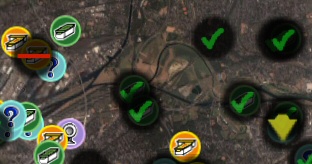
A new Version (1.06) of GoogleEarthTweaker has just been released.
With this program you can convert Geocache GPX files to make them look “nice” in GoogleEarth:
You can get the latest version here (free): Download
Posted in New Release, Off-Topic | Comments Off on New GoogleEarthTweaker
March 9th, 2007
Example 1: Only office documents should get synchronized.
Positive list for files:
*.xls
*.doc
*.ppt
Example 2: Backup files should not get synchronized.
Negativliste for files:
*.bak
*.backup
Copy of *
Example 3: Backup folders should not get synchronized.
Negative list for directories:
Backup8
Example 4: The backup folder in the logfile directory should not get synchronized.
Negative list for directories:
\logs\backup
Example 5: Only files in the root directory and in the folders “src” and “res” should get synchronized. These folders are at top level.
Positive list for folders:
\src
\res
Example 5: Only files in the root directory and in the folders “src” and “res” (and their subfolders) should get synchronized. These folders are at top level.
Positive list for folders:
\src
\src\*
\res
\res\*
Example 7: Only files in the subfolders “src” and “res” should get synchronized. Several directories with these names can exist in the directory tree:
Positive list for files: (yes, files)
\*\src\*
\*\res\*
Try it: Download Easy2Sync for Files
Posted in Files, Sync, Trick | Comments Off on Positive and negative lists for file synchronization – Examples
March 8th, 2007
Is Berlin too far away for you? You can still visit it now, with GoogleEarth. As Golem reports, there’s quite a lot of 3d data available that can be viewed in Google’s software. Quite amazing.
Posted in News, Off-Topic | Comments Off on Berlin in 3d
March 7th, 2007
Yes, it’s release time. Now it’s the turn of Easy2Sync for Outlook.
There are quite a few changes this time, like UI improvents, a second trigger folder, a new task type and enhanced Vista compatibility.
You can download the latest version here.
Posted in New Release, Outlook, Sync | Comments Off on Easy2Sync for Outlook 1.20
March 5th, 2007
Changing the help system is a big thing, and, well, we missed one thing in the last release. The help was complete, but the F1 hotkey didn’t bring up the right context page for THAT dialog. It’s fixed now, you can find the update here:
http://www.easy2sync.de/en/produkte/easy2sync_down.php
Posted in Files, New Release, Sync | Comments Off on Easy2Sync for Files 1.21
February 27th, 2007
A new version of Easy2Sync for Files is out. Version 1.20 brings some useful new details:
- Tasks can be deactivated with their context menu
- Two trigger folders can be configured now
- Last target directory (because of rotating backups) shown in tooltip
- Also %YEAR2%, %YEAR4% can be used for rotiating backups
Try the new version here: Download.
Posted in Files, New Release, Sync | Comments Off on Easy2Sync for Files 1.20
February 26th, 2007
We’re having a second run at Bits du jour today, so you can get the ReplyButler Business Edition for an amazing $19,99! Check their website for the details.
If you haven’t checked out ReplyButler you can do so here. It’s our “Outlook help-desk plugin with integrated multi-language text module management and automatic name answering”.
Posted in Add-In, Outlook | Comments Off on ReplyButler today for $19,99
February 21st, 2007
Yes, a new Butler is here. No new features this time, but some minor improvements and bug fixes. No big thing, but worth the update. Get it here.
Posted in New Release, ReplyButler | Comments Off on ReplyButler 1.26
February 18th, 2007
Do you keep the e-mails you answered? Probably. Do you keep them well organized? Probably not.
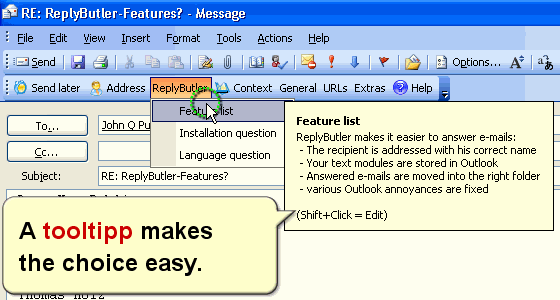
With ReplyButler that’s easy, because it’s done automatically. The program can automatically move and e-mail that you answered into the right folder. The customer is talking about “Product A”? Simply defined a rule for the products name and ReplyButler will move any e-mail where that product is mentioned in subject and / or mail body.
ReplyButler can move the original e-mail, or also your answer (after it’s been sent) – whatever you like.
Try it, I promise that you won’t want to miss it any more!
Posted in Outlook, ReplyButler, Trick | Comments Off on Automatic e-mail organization with ReplyButler
February 16th, 2007
Especially when you’ve got duplicate contacts, it can happen that the contacts are not quite the same, but similar. Now what can you do about this? Deleting simply one version probably isn’t what you want.
With 1-Click duplicate for Outlook it’s easy by default. Simply run the scan in the 1-click mode and the program will merge the contacts.
Meaning: If the items are the same, it’s fine. If some items are different, they’ll be assigned both value. The new one and in brackets the old one. This way, you still have both values (in case that you still need the old phone number, for example).
If you’re using the advanced mode, please make sure that you don’t disable the contact merge option for this (it’s enabled by default):

Give it a try now! (It even works with the demo version.)
Posted in Duplicates, Outlook | Comments Off on Merging contacts (duplicates)
February 14th, 2007
Easy2Sync for Files can exclude files from synchronization depending on positive and negative lists. These lists are very powerful, but if you don’t know how to handle them, you can also make powerful mistakes.
For each directory and each file Easy2Sync, can check rules to see if this directory or file should be synchronized. Despite their name, negative lists are less restrictive and most of the time a better choice.
A typical mistake is to expect intelligence from the software when applying your rules (especially if you’re using positive lists). Easy2Sync exactly follows your rules but it can’t ‘understand’ them.
Now what does that mean?
Often, you’ll man to synchronize a certain directory. This is normally configured corrected. But your rules may disallow the synchronization of the directory above. Result: Easy2Sync encounters the directory above and notices that the directory above may not be synchronized according to the rules. And thus it ignores the entire sub-tree, including the subdirectory for which you specified special rules.
Try it!
Posted in Files, Sync, Trick | Comments Off on Positive and negative lists for file synchronization
