Minimize any app into the tray with the new version
Tuesday, October 28th, 2008We’ve just published version 1.05 of our minimizer application. If you had any trouble with the installation, please try the lastest vresion of TheBest Minimize to Tray.



We’ve just published version 1.05 of our minimizer application. If you had any trouble with the installation, please try the lastest vresion of TheBest Minimize to Tray.
We’ve just released Easy2Sync for Outlook 2.04. There are some small, but interesting improvents this time.
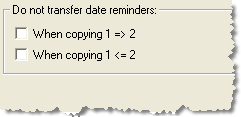
A usual, the update is free for registered users of Easy2Sync for Outlook. For more info about the Outlook sync software, please refer to the product page.
We’ve just published a new release of Easy2Sync for Files. It’s a minor update, with little changes. If you had trouble setting up new tasks that only synchronize local folders (and not network folders), you should have a look. Furthermore, by popular request, the new version allows you to send status mails to multiple receipients (instead of just one).
As with all our software, updates are free for registered users. More info here: On our File sync software.
We’ve just released version 2.05 of Company Logo Designer. The new release makes it easier to use the templates and to edit the logo colors.

Company Logo Designer 2.05
Please have a look at the new version if you want to design your logo.
We’ve just published a new version of Easy2Sync for Outlook. If you’re happy with synchronizing your Outlook, you don’t have to hurry to get the update. 😉 This time, there are only some minor changes.
The “Preview” dialog shows even more data now and the “Create shortcut” function can now also create “Autorun.inf” files – A nice thing, because this way Easy2Sync can automatically be run when an USB device is plugged in.
Please visit the product page to sync your Outlook with the new version.
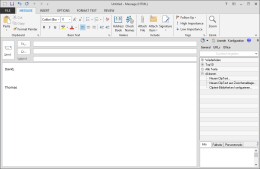
We’ve just published a new version 2.01of our Helpdesk software ReplyButler. The new release 2.01 has several small bug fixes. So if you had any problems with resizing the text module sidebar or with e-mails with special characters, give the new version a try.
More info on the ReplyButler Homepage.
Another version of 1-click duplicate delete for Outlook is out with some small, but useful improvements:

Duplicate Delete for Outlook
You can find the new version here: Outlook Duplicate remover. (Please use this link for the spanish version: Eliminar Outlook duplicados)
A new version of Easy2Sync for Outlook is out now. The changes are mostly in the area of the new task wizard and an improved preview dialog. Sorry, no big new features this time. 😉
Please click on Easy2Sync for Outlook to get the new version.
A new version of out Outlook Textmodule tool ReplyButler is out. And, beware, it looks very different now. We’ve ade some major changes in the user interface to make it easier and faster to reach the text modules that you need for your helpdesk work!
The new version works with a sidebar. Have a look:
ReplyButler: Sidebar mode
Apart from making it easier to search for the right text module, the program automatically shows possible matching text candidates whenever you answer an e-mail in Outlook. This will help you answer mails in less time.
Give it a try and download the new ReplyButler version!
(BTW: If you prefer the old toolbar style, you can still activate that mode in the “Extras” menu. 😉
A new version of 1-Click Duplicate Delete for Outlook is out now.
The main improvements are in the better merging of contacts. Contacts are an amazing thing. Every time we think, we’ve covered everything, some detail appears. 😉 Bottom line is: The new version can detect more duplicates, will suggest the appropiate steps automatically and do a better job of merging them.

Get the duplicate remover now.
A new release of Easy2Sync for Outlook is available. Version 2.01 contains mostly improvements and a few bugfixes this time. The biggest change is the completely reworked wizard for new tasks. It’s much easier now to create new Outlook synchronization tasks (or copy tasks or team calendar tasks or…). Furthermore, if you’re using a NAS device, you should also check out the new version, because with the previous one, you might have gotten an unnecessary warning message.
Download the sync software here.
The new version has a great new feature: It can move solve riddle (“unknown”) caches to their real location (instead of the usual dummy location). This is just great for planing trips, ’cause you can see in Google Earth where the box *really* is located.
To use this feature, you have to create a simple text file (for example with the Windows text editor “Notepad”). Each line contains the GC-Number and the North and East or West coords, separated by semicolons. For example “GC1234;N49 12.345;W002 12.345”. Please note that this coordinate format is mandatory. GoogleEarthTweaker does not support other formats here, sorry. The next and final step is to simple enter the path and filename into the respective edit box in the dialog (or use the […] button to select the file). That’s all. The file can contain as many lines/caches as you can solve.
Enjoy your caching trips!
(Oh, by the way: The moved riddle caches will be marked with a red circle arround the cache in Google Earth. This way you know, that this icon showsreal box coordinates.)
You can download the latest version here.
Easy2Sync for Files 1.28. This release contains mostly minor changes and fixes. The biggest change is a fix to a problem that could cause the user interface to become slow on some computers.
More into on the Easy2Sync for Files homepage.
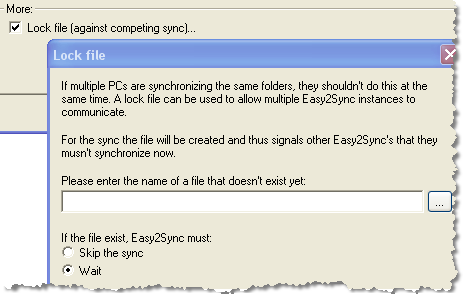
Another version of Easy2Sync for Files has been published. It’s easier now to set up new synchronizsation tasks with the explorer style browser. Furthermore you now use lock files to prevent competing syncs of the same folder if you’re running Easy2Sync on several computers:
For more information about the file sync features, please visit the Easy2Sync for Files Homepage
Easy2Sync for Outlook 2.0 is out. Yes, we finally “dared” the step to version 2.0. 😉
The big news is the speed of the software. The scanning of the PST files is about 7x faster now.
But there are also some feature news, especially if you’re working with team calendars. The program can now copy multiple calendars into one and you can decide whether you want to allow it to copy changed items back into the original calendars or not (Task type: Copy merge / Sync merge).
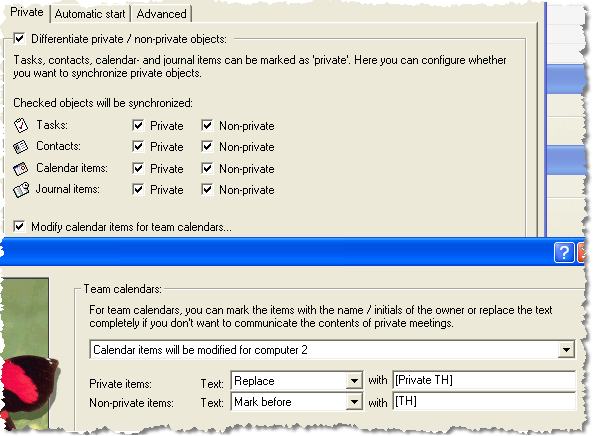
But the real feature is this one: You can change your calendar subjects while synchronizing. So you can either mark your calendar items with your initials for the group calendar. Or you can totally replace the subejct if you want to keep the nature your private appointments private.
If you want to have a closer look look at the new features, please visit our Outlook sync page.
