Archive for the ‘New Release’ Category
Tuesday, December 4th, 2007
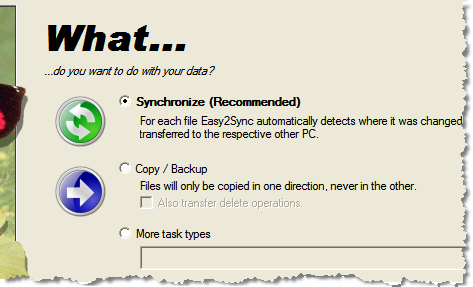
A new release of our file synchronization software is out: Easy2Sync for Files 1.25. If you plan to set up new sync tasks, the new release it a must. A new wizard makes the configuration so much easier. It support file synchronization, copy/back modes and several other task types. Even a synchronization with an FTP server is supported by the wizard.
Here’s the sync task type page:
To find out more about the new Easy2Sync version or download the Freeware Edition, please visit the product page.
Posted in Files, New Release | Comments Off on Easy2Sync for Files 1.25
Friday, October 26th, 2007
A new version of our duplicate removal software is now out. It contains some bugfixes and smaller improvements. For example the merging of contacts that already have been merged on previous scans was now improved.

You can get the latest version here.
Posted in Add-In, Duplicates, New Release, Outlook | Comments Off on New Version: 1.10 of our Outlook duplicate removal software
Thursday, October 11th, 2007
A new release for our Outlook helpdesk software is available: ReplyButler. 1.30.

The new release has a lot of new features and improvements:
- Text modules can now contain e-mail attachments
- The addressing phrases can be quickly reconfigured
- There more icons available
- It’s faster
You can get the latest release on the Download page.
Posted in Add-In, New Release, Outlook, ReplyButler | Comments Off on ReplyButler 1.30: Outlook text modules with attachments
Monday, October 1st, 2007
Happy Birthday, Easy2Sync for Outlook got another release older. 😉
The new version brings a new feature, that you may already know from Easy2Sync for Files. If you’re synchronizing a PST files that’s stored on an USB drive then the drive letter can become a problem. Will can change the drive letter for device when you re-plug it.
Because the sync of an USB device is an important issue we’ve added support for this long ago. But specifying the right parameters wasn’t really easy. We changed that. Now simply enter the path. Easy2Sync for Outlook will recognize the USB status and suggest the right things.
Give it a try and synchronize your Outlook e-mails.
Posted in New Release, Outlook, Sync | Comments Off on New Outlook sync software Release: 1.25
Tuesday, September 18th, 2007
Another release of Easy2Sync for Files. No new features this time, just some fixes. If you had problems with synchronizing FTP websites or if the task properties took their sweet time appearing on your screen, then the new release is just for you.

Go to the download page.
Posted in Files, New Release, Sync | Comments Off on Synchronize your Files with Version 1.24
Monday, September 10th, 2007
The previous releases of Easy2Sync for Files mostly brought detail changes and bug fixes.
Not this one.
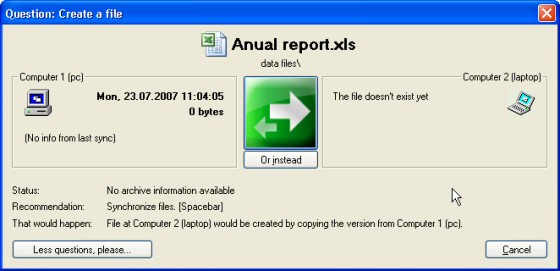
This time, there are some really big changes in Easy2Sync for Files. One of the most obvious is the new confirmation assistant. Whenever Easy2Sync wants a confirmation before synchronizing a file it is displayed. And we totally reworked it to make it nicer and clearer:
Furthermore the program helps you setting up your synchronization tasks and suggests often used paths for that.
And of course there are some nice new details. You can right-click task collections now to run a single sync task from the collection. And the program helps you specify drive-letter independed USB-paths.
Lots of changes. Want to sync your files? Then get the latest version.
Posted in Files, New Release, Sync | Comments Off on Synchronize your Files with Version 1.23
Friday, August 10th, 2007
Yes, version 1.29 is out and brings some improvements and bug fixes. It’s amazing how many detatils there are to consider and what variaty of things people write into the field where their name should go (making the work for ReplyButler difficult).
So, the name and language recognition where improved in this release once again to give you the perfect help desk experience. If YOU encounter one of these problem e-mails when doing your e-mail support with ReplyButler, please drop us a line and include the problem e-mail and we’ll get YOUR special case fixed, too. 🙂
Posted in Add-In, New Release, Outlook, ReplyButler | Comments Off on New Version of our e-mail helpdesk tool
Thursday, July 19th, 2007
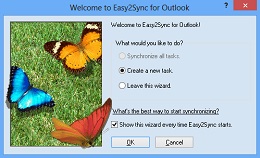
Keep your Outlook E-Mails, contacts, calendar items etc. in sync on multiple PCs with the new version of Easy2Sync for Outlook. If you’re using Outlook and multiple PCs (Desktop and notebook), then Easy2Sync is just what you need. 😉
The new version has an improved sync overview dialog and password support for Exchange servers.
Download our Outlook Sync program!
Posted in New Release, Outlook, Sync | Comments Off on New Release: Easy2Sync for Outlook 1.24
Tuesday, June 26th, 2007
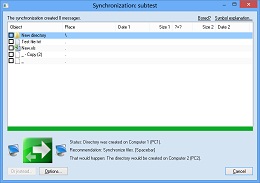
When you want to synchronize your files, Easy2Sync should be your first choice. And the new releases files some final details for Vista compatibility to make everything run smoothly.
So, give it a a try and download the latest version. 😉
Posted in Files, New Release | Comments Off on New Version: Easy2Sync for Files 1.22
Tuesday, June 12th, 2007
Yes, another version is out (1.28).
ReplyButler, our keyboard program. (Which just shorthand for Outlook-plugin-canned-text-storage-email-answerer-with-name-recognition-and-automatic-text-replacement-context. Now you know why we prefer the short name.)
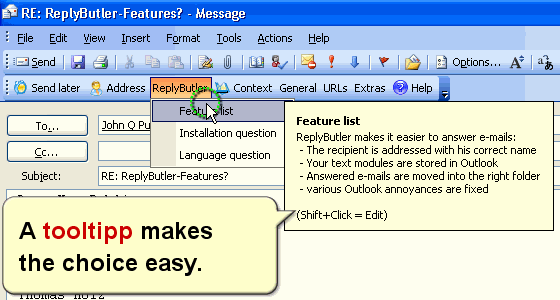
Since the program has evolved very nicely, the changes are mostly details and bug fixes. For example the e-mail moving dialog now remembers the last folders you had the e-mail sorted it. (Automatic mail sorting feature)
So, it’s even better now and we have a free version: Why not download it for your Outlook?
Posted in New Release, ReplyButler, Useful | Comments Off on ReplyButler 1.28 – Best keyboard program ever ;-)
Friday, June 8th, 2007
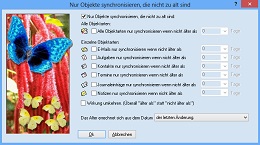
Another day, another release. Version 1.22 didn’t last very long because we had the wrong language in the assistant. That’s fixed now, our apologies for any inconvenience caused.
The new release also fixes a minor problem with configuration under Windows 98 (when working with diskettes.)
Do you want to try Easy2Sync for Outlook? You can download the Freeware Edition here.
Posted in New Release, Outlook, Sync | Comments Off on Easy2Sync for Outlook 1.23 is out!
Wednesday, May 30th, 2007
We’re going gold: Version 1.0 of TheBest Minimize to Tray is out.
Now you can hide any application in the system tray. Manually with a mouse click or automatically if you don’t use the program. Get more space on your desktop!
Try it and download TheBest Minimize to Tray:

Posted in Minimize to Tray, New Release, Useful | Comments Off on 1.0 in your Tray
Tuesday, May 22nd, 2007
Yes, it’s finally out. Our new little tool to minimize other programs to the system tray.
Why we wrote it? Because the world needs it, we think. Yes, there are already other programs out which do something similar, but they don’t work very well, are cumbersome to configure or lack features. At least we didn’t find any that we wanted to use ourselves.
And it IS really useful. Finally the taskbar is a bit more “clean” and the programs that currently aren’t needed, are minimized into the tray (shown as an icon next to the system clock).
You can try it for yourself: Get the demo of TheBest Minimize to Tray.
Oh, and here’s the next revision for the “Minimization gnome”. 😉

Posted in Beta, Minimize to Tray, New Release | Comments Off on Public Beta: TheBest Minimize to Tray
Friday, May 18th, 2007
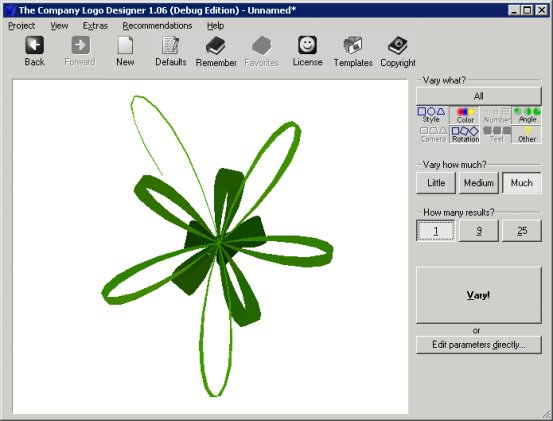
Posted in Company Logo Designer, New Release | Comments Off on New Release of Company Logo Designer
Tuesday, April 10th, 2007
Yes, version 1.07 is now available for trial and to all registered users. Since the software just works great, there was little to fix / improve. Differences in very long texts are now displayed better and the recognition of duplicates with tiny differences was improved.
The toolbar (and the menu):

You can download the demo version here and the registered version here.
Posted in Add-In, Duplicates, New Release, Outlook | Comments Off on New Release: 1-Click Duplicate Delete for Outlook