Archive for the ‘ReplyButler’ Category
Tuesday, August 14th, 2012
 The new version 5.01 of our outlook boilerplate software is now available. The update has some detail improvements for plentyMarkets user. New RB tags support the new attributes and the configuration was simplified.
More information about the program can be found on the Outlook text modules page.
Posted in New Release, Outlook, ReplyButler | Comments Off on ReplyButler 5.01: Details for plentyMarkets
Wednesday, August 8th, 2012
 The new version 5.00 of our text module software for Outlook now available. The update brings a completely done support for the plentyMarkets-API. This was necessary since the old API was turned off in plentyMarkets 4.4.
Furthermore it’s now possible to configure separate colors for new e-mails and answers and the configuration options for tracking numbers, move rules and special cases have been improved.
More information about the program can be found on the Outlook text modules page.
Posted in New Release, Outlook, ReplyButler | Comments Off on ReplyButler 5.00: Improved support for plentyMarkets
Friday, March 30th, 2012
The new version 4.14 of our boilerplate text for Outlook software ReplyButler is now online. The update includes several improvements and bug fixes. It’s now possible to search / replace movement rules, text modules can now be used for contacts and handling formatted texts is now faster.
More information about the program can be found on the Outlook text modules page.
Posted in New Release, Outlook, ReplyButler | Comments Off on ReplyButler 4.14: Text modules for Outlook
Thursday, October 20th, 2011
 The new version 4.13 of our boilerplate text for Outlook software ReplyButler is now online. The update includes smaller improvements and bug fixes. The greeting phrase can now be generated from plentyMarkets data and attachments can be dragged+dropped into the clip text properties dialog.
More information about the program can be found on the outlook text modules page.
Posted in New Release, Outlook, ReplyButler | Comments Off on Outlook text modules with ReplyButler 4.13
Friday, July 15th, 2011
The new version 4.12 of our text modules software ReplyButler for Outlook is now available. The update brings some smaller changes: We adjusted the links to the plentyMarkets shop system according to their update, the exceptions dialog is now larger and some smaller problems were fixed.
More information about the program can be found on the outlook text modules page.
Posted in New Release, Outlook, ReplyButler | Comments Off on ReplyButler 4.12
Wednesday, June 8th, 2011
The new version 4.11 of our software ReplyButler is now available. The new version fixes a few bugs and allows you to use text modules in Outlook tasks. We’ve also introduced a completely new feature: The program can now automatically delay e-mails for 10 minutes if a (configurable) text indicates that you’re referring to a (current pending) upload, for example because you’ve included a link to a special server.
More information about the program can be found on the ReplyButler page.
Posted in New Release, Outlook, ReplyButler | Comments Off on ReplyButler 4.11 – Powerful text modules for Outlook
Saturday, May 7th, 2011
Several programs exist to speak an e-mail instead of typing it. One common problem however is the addressing phrase: The voice recognition programs often can’t recognize names properly (especially last names).
If don’t want to skip the greeting phrase (which would be impolite), ReplyButler can help you (the Home Edition is sufficient for this case). When answering an e-mail, the program automatically inserts the greeting phrase (with the correct name, gender, even title if required). You just have to dictate the actual e-mail.
This works even with new e-mails if the name of recipient can be guessed from the e-mail address. More information about ReplyButler.
Posted in Outlook, ReplyButler, Trick | Comments Off on Tip: Answering e-mails with speech recognition
Monday, March 28th, 2011
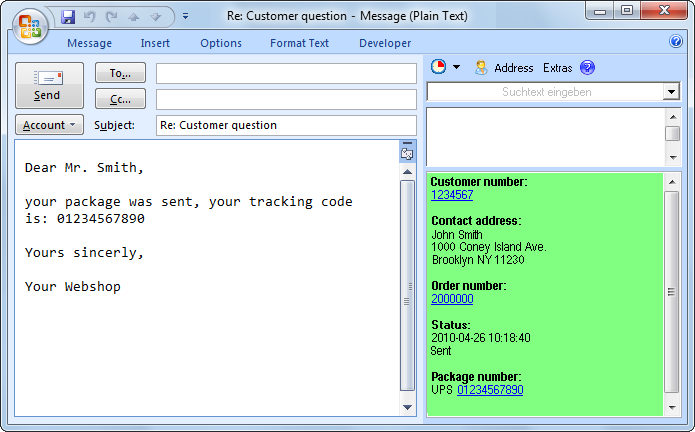 We’ve just published the new version 4.10 of our text modules software ReplyButler for Outlook. The new release allows you to use the Outlook 2010 “Social Pane” while using ReplyButler. So far this was a problem, but that’s now resolved.
Furthermore the new release fixes a problem with the attachment-forgotten-warning. If you were connected with an Exchange server, you might have seen this warning even though you didn’t forget the attachment.
More information about ReplyButler can be found on the Outlook text module page.
Posted in New Release, Outlook, ReplyButler | Comments Off on ReplyButler + Social Pane = 4.10
Thursday, February 24th, 2011
The new version 4.09 of ReplyButler is available. Apart from some minor corrections the internal structure was modernized to stop some problems (like the wrong mail icon) from occurring. Furthermore the name recognition was improved for merchants that receive mails from Amazon Marketplace.
More information about ReplyButler can be found on the Outlook text module page.
Posted in New Release, Outlook, ReplyButler | Comments Off on Outlook text modules 4.09
Friday, December 31st, 2010
 The last update of the year: The new version 4.08 of our Outlook text module software ReplyButler is available. It fixes several minor bugs with the name recognition / inserting and for the use of text modules.
More information about the program can be found on the text modules product page.
Posted in New Release, Outlook, ReplyButler | Comments Off on ReplyButler 4.08
Thursday, November 4th, 2010
The new ReplyButler version is now available. We’ve redone the options and moved the text module administration into the options. Furthermore you’ll now get an automatic greeting phrase for new mails as soon as you entered the recipient. Useful for shop-owners: Togehter with plentyMarkets you can now see information about E-Bay order mails.
More information about ReplyButler can be found on its homepage.
Posted in New Release, Outlook, ReplyButler | Comments Off on ReplyButler 4.07
Tuesday, October 12th, 2010
ReplyButler is all about Outlook answers and texts. And there are few interesting Tricks if you want to use the same texts in many / all e-mails.
This can be used for phrases like “thank you for your e-mail” as well as for dynamic texts containing unique promotion codes.
In the simplest case you only want to have always the same text at the beginning of the e-mail. Simply append it to the greeting phrase. You can use the placeholder {RB_Break} to insert line breaks.
Using the regular text modules is of course more convenient and more powerful. They support images, placeholders for promotion codes from external files, etc. Simply create a text module and activate that they always want to use it:
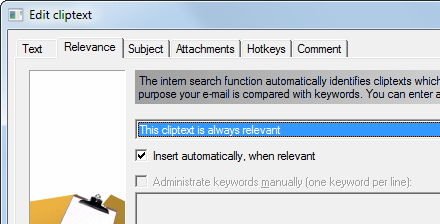
Such a phrase looks of course unfitting if the same customer keeps reading it in every e-mail. You can tell ReplyBuler to remember for which customer the phrase was already used and the (if you’re inserting it manually) warn you (or simply do nothing if the phrase would be inserted automatically).
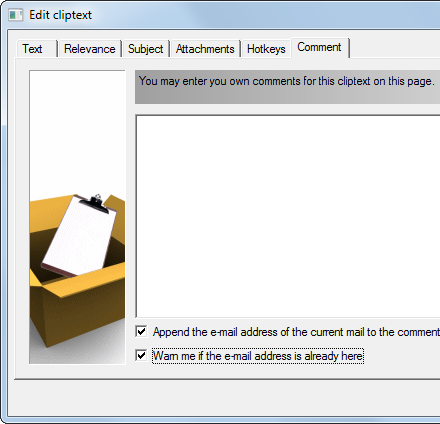
This way each customer will see the phrase only once.
Posted in Outlook, ReplyButler, Trick | Comments Off on Trick: Automatic phrases with ReplyButler
Thursday, October 7th, 2010
The new version 4.06 brings a lot of new features for our textmodule software ReplyButler for Outlook. It’s now possible to store notes per case or per customer, remove one’s own (or other) e-mail address from the recipient list and use a hotkey to let ReplyButler move e-mails (without answering) from an Outlook folder using the movement rules.
There are also new features for webshop owners: ReplyButler now supports Amazon-Order-Ids. They’re used to find the coresponding plentyMarkets data and ReplyButler supports a hyperlinks / hotkey to bring you to the Amazon webpage. Furthermore the sidebar search box now recognizes customer e-mail addresses, plenty-customer#, plenty-order# and Amazon-Ids.
For more info about ReplyButler, please refer to the product page.
Posted in New Release, Outlook, ReplyButler | Comments Off on ReplyButler 4.06: Case notes, Amazon & more
Tuesday, August 17th, 2010
The version 4.05 of our text module software ReplyButler for Outlook is now available. The new version once again includes a number of small improvements and some bugfixes. Now it’s easier than ever to use plentyMarkets data in the boilerplate text module. Simply select the desired data from the token menu (lightning icon). Done. Furthermore ReplyButler now auto-detects data from e-mail forms when replying and you can easily hide the sidebar’s library buttons. And when your text modules adds recipients/CC/BCC now the program avoids duplicates when insert them.
More info can be found here: ReplyButler – Text phrases for Outlook
Posted in New Release, Outlook, ReplyButler | Comments Off on ReplyButler 4.05
Thursday, June 24th, 2010
The new version 4.03 of our text module software ReplyButler for Outlook is now available. The update fixes a problem with the plentyMarkets integration which didn’t work in 12% of the cases.
And there are new features:
- A search function in the choose-icon-dialog makes it easier to find the right icon for a text module.
- Each text module can now have a comment.
- ReplyButler can remember which text module was already used for which customer and warn you if you send the same text module to the same customer again.
More information about ReplyButler can be found on these pages:
Posted in New Release, Outlook, ReplyButler | Comments Off on ReplyButler 4.03
