July 30th, 2008
A new version of Easy2Sync for Files is out. The release 1.29 features a better recognition of renamed folders and a better handling of the same:
- The recognition is safer
- The scan doesn’t have to be restarted once a folder is renamed
- The recognition can be automated
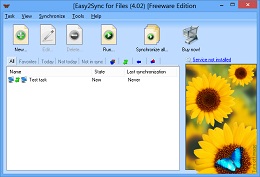
So, if you’re often renaming folders, check out the new version. As always, updates are free.
Please visit the homepage of our file sync software for more information and downloads.
Posted in Uncategorized | Comments Off on New version of our file sync tool
July 28th, 2008
 We’re running a promotion on our logo designer software. For a short time, you’ll get a stunning 75% discount on both Editions.
Try the Demo Edition now!
Posted in Uncategorized | Comments Off on Company Logo Designer promo
July 25th, 2008
Another version of 1-click duplicate delete for Outlook is out with some small, but useful improvements:
- If you’re searching for duplicates across folder boundaries, you can now configure which folder should keep its versions.
- Yes, we *finally* included a help file!
- Contact comparison was improved

Duplicate Delete for Outlook
You can find the new version here: Outlook Duplicate remover. (Please use this link for the spanish version: Eliminar Outlook duplicados)
Posted in Duplicates, New Release, Outlook | Comments Off on Outlook duplicate remover 1.18
July 23rd, 2008
A new version of Easy2Sync for Outlook is out now. The changes are mostly in the area of the new task wizard and an improved preview dialog. Sorry, no big new features this time. 😉
Please click on Easy2Sync for Outlook to get the new version.
Posted in New Release, Outlook, Sync | Comments Off on Synchronize Outlook with Version 2.02
July 19th, 2008
Hi, I’m test-running a new look, the “Baltimore” photo theme. Do you like it? 😉
Posted in Off-Topic | Comments Off on New look
July 18th, 2008
A new version of out Outlook Textmodule tool ReplyButler is out. And, beware, it looks very different now. We’ve ade some major changes in the user interface to make it easier and faster to reach the text modules that you need for your helpdesk work!
The new version works with a sidebar. Have a look:
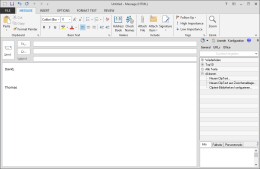
ReplyButler: Sidebar mode
Apart from making it easier to search for the right text module, the program automatically shows possible matching text candidates whenever you answer an e-mail in Outlook. This will help you answer mails in less time.
Give it a try and download the new ReplyButler version!
(BTW: If you prefer the old toolbar style, you can still activate that mode in the “Extras” menu. 😉
Posted in New Release, Outlook, ReplyButler | Comments Off on ReplyButler 2.0 – Use Outlook as helpdesk
July 10th, 2008
A new version of 1-Click Duplicate Delete for Outlook is out now.
The main improvements are in the better merging of contacts. Contacts are an amazing thing. Every time we think, we’ve covered everything, some detail appears. 😉 Bottom line is: The new version can detect more duplicates, will suggest the appropiate steps automatically and do a better job of merging them.

Get the duplicate remover now.
Posted in Duplicates, New Release, Outlook | Comments Off on Remove your Outlook duplicates with version 1.17
June 27th, 2008
No matter what you want to minimize – browser, office, editor, e-mail client – it should become a little easier with the new release 1.04 of or minimizing software. Some internet links in the help section were updated and a bug with minimizing help files was fixed. Interested? Have a look at TheBest Minimize to Tray.
Posted in Uncategorized | Comments Off on TheBest Minimize to Tray 1.04
June 27th, 2008
A new release of Easy2Sync for Outlook is available. Version 2.01 contains mostly improvements and a few bugfixes this time. The biggest change is the completely reworked wizard for new tasks. It’s much easier now to create new Outlook synchronization tasks (or copy tasks or team calendar tasks or…). Furthermore, if you’re using a NAS device, you should also check out the new version, because with the previous one, you might have gotten an unnecessary warning message.
Download the sync software here.
Posted in New Release, Outlook, Sync | Comments Off on New Outlook Sync version 2.01
June 17th, 2008
The new version has a great new feature: It can move solve riddle (“unknown”) caches to their real location (instead of the usual dummy location). This is just great for planing trips, ’cause you can see in Google Earth where the box *really* is located.
To use this feature, you have to create a simple text file (for example with the Windows text editor “Notepad”). Each line contains the GC-Number and the North and East or West coords, separated by semicolons. For example “GC1234;N49 12.345;W002 12.345”. Please note that this coordinate format is mandatory. GoogleEarthTweaker does not support other formats here, sorry. The next and final step is to simple enter the path and filename into the respective edit box in the dialog (or use the […] button to select the file). That’s all. The file can contain as many lines/caches as you can solve.
Enjoy your caching trips!
(Oh, by the way: The moved riddle caches will be marked with a red circle arround the cache in Google Earth. This way you know, that this icon showsreal box coordinates.)
You can download the latest version here.
Posted in Free, New Release, Off-Topic | Comments Off on GoogleEarthTweaker 1.10: Move solved riddles
June 6th, 2008
Easy2Sync for Files 1.28. This release contains mostly minor changes and fixes. The biggest change is a fix to a problem that could cause the user interface to become slow on some computers.
More into on the Easy2Sync for Files homepage.
Posted in Files, New Release, Sync | Comments Off on New File Sync version
May 19th, 2008
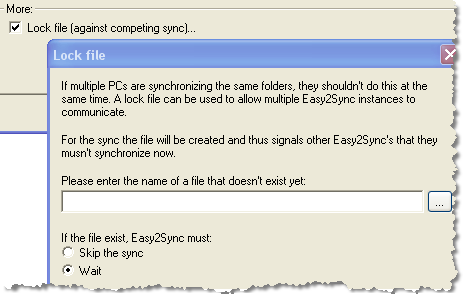
Another version of Easy2Sync for Files has been published. It’s easier now to set up new synchronizsation tasks with the explorer style browser. Furthermore you now use lock files to prevent competing syncs of the same folder if you’re running Easy2Sync on several computers:
For more information about the file sync features, please visit the Easy2Sync for Files Homepage
Posted in Files, New Release, Sync | Comments Off on Synchronize your files – Easy2Sync for Files 1.27
May 18th, 2008
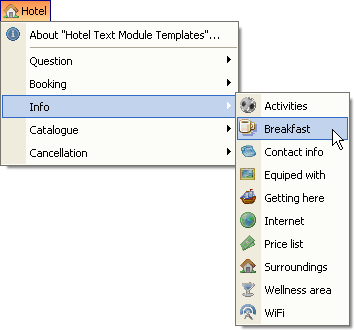
We just published a new text module template, this time specialized for hotels. The text module templates, are not complete text modules, but a pre-organized structure to help you find your own texts and policies for your Outlook helpdesk.
Have a look:
If you want to give it a try, please download the Freeware Edition of our Helpdesk software ReplyButler.
Posted in Free, Outlook, ReplyButler, Useful | Comments Off on New Textmodule template for helpdesks: Hotel
May 17th, 2008
Easy2Sync for Outlook 2.0 is out. Yes, we finally “dared” the step to version 2.0. 😉
The big news is the speed of the software. The scanning of the PST files is about 7x faster now.
But there are also some feature news, especially if you’re working with team calendars. The program can now copy multiple calendars into one and you can decide whether you want to allow it to copy changed items back into the original calendars or not (Task type: Copy merge / Sync merge).
But the real feature is this one: You can change your calendar subjects while synchronizing. So you can either mark your calendar items with your initials for the group calendar. Or you can totally replace the subejct if you want to keep the nature your private appointments private.
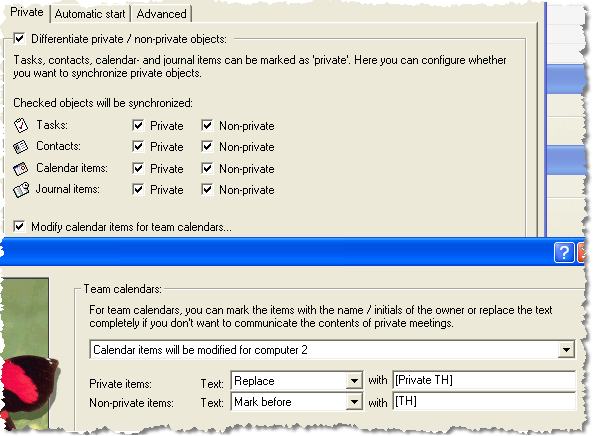
If you want to have a closer look look at the new features, please visit our Outlook sync page.
Posted in New Release, Outlook, Sync | Comments Off on 7x Faster Outlook Sync with 2.0
May 15th, 2008
It’s update week at ITSTH and this topic will cover our Duplicate Remover for Outlook. The new version features a better compatibility with the Danish Outlook version, better duplicate recognition for calendar items and can now remove (or not create in the first place) the “(Old: …)” texts when merging two similar, but not identical contacts.
Click here for more info on the duplicate remover software.
Posted in Duplicates, Outlook | Comments Off on Duplicate File Remover 1.16
