June 10th, 2007
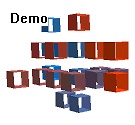
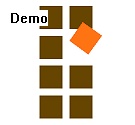
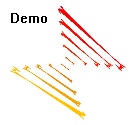
When working with the Company Logo Designer software, template files can be a great timesaver and give you an impression what logo types the program can design.
And this week we have a pack of 25 free templates for Business Logos. Here are some samples:



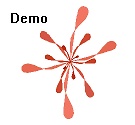
Download the logo pack here.
Posted in Company Logo Designer, Free, Useful | Comments Off on Freebee of the week: Free Business Logo templates
June 8th, 2007
Another day, another release. Version 1.22 didn’t last very long because we had the wrong language in the assistant. That’s fixed now, our apologies for any inconvenience caused.
The new release also fixes a minor problem with configuration under Windows 98 (when working with diskettes.)
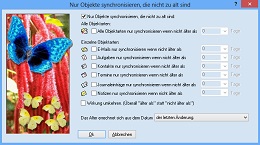
Do you want to try Easy2Sync for Outlook? You can download the Freeware Edition here.
Posted in New Release, Outlook, Sync | Comments Off on Easy2Sync for Outlook 1.23 is out!
June 6th, 2007
It pays off to record your typical phrases in e-mails and store these canned texts to reuse them later (like in a macro key recorder). And there’s a trick in ReplyButler to make this very easy.
Simply type your e-mails as usual. (Note ReplyButler requires Microsoft Outlook as e-mail client.) When you’ve written the text and it strikes you that you might want to re-use a part of it later, simply:
- Select that part
- In ReplyButler: Choose “Extras” / “Generate cliptext from selection”
And that’s it. Our keyboard tool “ReplyButler” will create a ClipText for you and ask for the folder to store it in.
Give it a try:
 Download ReplyButler
Posted in Outlook, ReplyButler, Trick | Comments Off on Trick: Simple phrase recording with ReplyButler
May 30th, 2007
We’re going gold: Version 1.0 of TheBest Minimize to Tray is out.
Now you can hide any application in the system tray. Manually with a mouse click or automatically if you don’t use the program. Get more space on your desktop!
Try it and download TheBest Minimize to Tray:

Posted in Minimize to Tray, New Release, Useful | Comments Off on 1.0 in your Tray
May 29th, 2007
Ever tried doing support work. At least for smaller companies the huge help desk programs are quite cumbersome to handle and install.
But ReplyButler is an easy alternative. The unique program can store your canned texts, suggest matching answers for the customers e-mails and also moves the answered e-mails into the right folders. Basically, all the things you need for a small helpdesk.
And when your company grows, no problem. ReplyButler can even share its text blocks, so that multiple Outlooks can access your prewritten text blocks.
Try it and get ReplyButler now.
Posted in Outlook, ReplyButler | Comments Off on Simple Outlook Helpdesk System: ReplyButler
May 22nd, 2007
Yes, it’s finally out. Our new little tool to minimize other programs to the system tray.
Why we wrote it? Because the world needs it, we think. Yes, there are already other programs out which do something similar, but they don’t work very well, are cumbersome to configure or lack features. At least we didn’t find any that we wanted to use ourselves.
And it IS really useful. Finally the taskbar is a bit more “clean” and the programs that currently aren’t needed, are minimized into the tray (shown as an icon next to the system clock).
You can try it for yourself: Get the demo of TheBest Minimize to Tray.
Oh, and here’s the next revision for the “Minimization gnome”. 😉

Posted in Beta, Minimize to Tray, New Release | Comments Off on Public Beta: TheBest Minimize to Tray
May 18th, 2007
Posted in Company Logo Designer, New Release | Comments Off on New Release of Company Logo Designer
May 11th, 2007
Another update for the tray icon:

Posted in Minimize to Tray, News, Preview | Comments Off on Second revision
May 8th, 2007
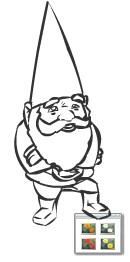
Not much is posted here, as we’re quite busy with a new application. Can’t tell much yet, but it involves the system tray.
Here’s a design for the icon (first version):
Posted in Minimize to Tray, News, Preview | Comments Off on Work in progress
April 10th, 2007
Yes, version 1.07 is now available for trial and to all registered users. Since the software just works great, there was little to fix / improve. Differences in very long texts are now displayed better and the recognition of duplicates with tiny differences was improved.
The toolbar (and the menu):

You can download the demo version here and the registered version here.
Posted in Add-In, Duplicates, New Release, Outlook | Comments Off on New Release: 1-Click Duplicate Delete for Outlook
March 29th, 2007
Having the same e-mail twice is bad enough. Bad what happens if you have the same e-mail twice in your Outlook – but in different folders? This might happen if you answered your e-mails, moved the originals and then, for same some reason, downloaded them again by accident.
Not a big thing, 1-Click duplicate delete for Outlook can fix this easily.
Simply run the scan in advanced mode:
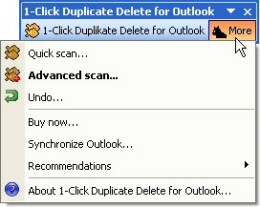
Then, tell the program where to search, to include sub folders and to recognize duplicates that are in different folders:

That’s all, the program will do the rest, scan your mail folders and recognize and remove the duplicate e-mails. Try it now! Download 1-Click Duplicate for Outlook.
Posted in Add-In, Duplicates, Outlook, Trick | Comments Off on Duplicate e-mails in different folders
March 26th, 2007
Yes, Easy2Sync has some special terms, because some very special things can happen during the synchronization (both for file synch and e-mail synch).. Want to know what that means? Simply press F12 (which open the options), and on the first page wait with the mouse cursor over the synch case item you want to know more about. A tooltip with the explanation will appear.
Download Easy2Sync for Files/ Download Easy2Sync for Outlook.
Posted in Files, Outlook, Sync | Comments Off on Asynchronous WHAT??
March 23rd, 2007
On some Windows systems, USB devices (USB sticks, USB hard disks or whatever) like to change their drive letter. It’s their idea of having fun. Plug it in and it’s E:\, take it out, plug it in again and it’s F:\. Great. How can you synchronize your files with such a chameleon? Any path that you enter is bound to be wrong, sooner or later. So how can you synchronize with it?
Well, you can, with Easy2Sync.
First, make sure that the device has a unique name. You can edit that it its properties, if necessary.
At the task, where you’d normally enter the drive letter, you can enter the drive name, along with some special markers:
In General: %DRIVELETTER:MyDriveName%:\
The percent signs, the colon and the word “DRIVERLETTER” are pre-defined markers. You only have to fill in the name of your USB drive. If your USB stick had the name “MyUsbStick”:
%DRIVELETTER:MyUsbStick%:\
Or if you want to synchronize with a subdirectory:
%DRIVELETTER:MyUsbStick%:\MySubdirectory\
Try it:
Download Easy2Sync for Files
Download Easy2Sync for Outlook
Posted in Files, Outlook, Sync, Trick | Comments Off on Synchronzing with an USB stick that changes its drive letter
March 20th, 2007
When you’re synchronizing files, you may encounter the problem that the file can’t be synchronized because it’s locked.
And sometimes it’s not really important. If you’re backing up 100.000 files every day, why worry about one that is currently open? You can instruct Easy2Sync for Files not to report such copy problems. Have a look at the options:

You can simply check “No message box on copy errors”.
Try it and Download Easy2Sync for Files.
Posted in Files, Sync, Trick | Comments Off on Handling Locked Files 2/2
March 18th, 2007
How many times did you send an e-mail, but forgot the attachments? Don’t try to count, fix it!
One of the many thing that ReplyButler does is to save you from this embarrassment. It analyzes your answer, and your attachments and asks you if it looks like you forgot the attachment. Automatically.
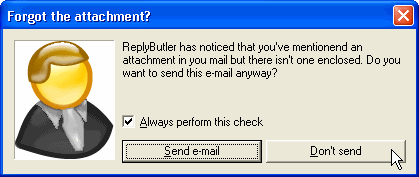
Try it! Download ReplyButler.
Posted in Add-In, Outlook, ReplyButler, Trick | Comments Off on Forgotten attachments