December 20th, 2006
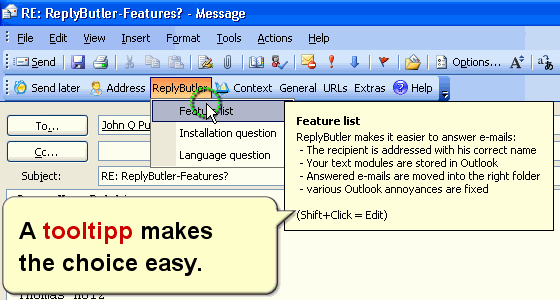
ReplyButler has the nice feature of automatically addressing the recipient of an answer correctly. But even nicer (and perhaps less-know) is its integration with canned texts. You can store your canned texts into ReplyButler and thus in Outlook and choose the right text directly from your email window. These texts can save you a LOT of work if you’re doing support for a product or answer the e-mails for a website. Type your answer just once and re-use it many times.
Posted in Add-In, Outlook, ReplyButler | Comments Off on Doing support with canned texts I
December 19th, 2006
Outlook can mark any mail that you read as “unread”, so it won’t be printed in bold any more. Perhaps you wanted that. Perhaps not.at. Perhaps not. You can right-click any more to change the “read” status or use the shortcut Ctrl+U (mark unread) or Ctrl+Q (mark read).
BTW: Did you know that Easy2Sync for Outlook, will also synchronize the read / unread state of an e-mail?

Posted in Outlook, Trick | Comments Off on Simple Trick: Making mails (un-)read
December 19th, 2006
The new version 1.04 of 1-Click Duplicate Delete for Outlook is out, you can download it here. Among other (smaller) things, the new version has some improvements on recognizing duplicates. Some duplicates, that weren’t recognized before, now get removed, like duplicates created bei OlTrans and contacts where the Dr. Title is different.
Posted in Add-In, Duplicates, New Release, Outlook | Comments Off on New Release: 1-Click Duplicate Delete for Outlook
December 18th, 2006
A bit off-topic in this blog, but the Opera browser is a favorite of mine. The new version (Golem, PC Welt)contains a phishing filter, which (sadly) is important nowadays.
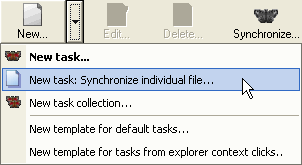
BTW: Opera stores its bookmarks in a file named opera6.adr. If you have Opera running on multiple computers, you can use the Freeware Edition of Easy2Sync for Files, to synchronize that file. There’s even a special assistant for synchronizing individual files.
Posted in Off-Topic, Sync, Trick | Comments Off on Opera 9.10 – Browser & Mail client
December 16th, 2006
The headline may sound a bit strange, as we have another product named Easy2Sync for Outlook. But since that’s only for Outlook (and not Outlook Express). But don’t worry, with some limits, you can still sync them.
Search your harddisk for *.dbx files or go to Tools / Options / Maintenance and choose the StoreFolder button to find the folder where your mail files are stored. You can use Easy2Sync for Files to synchronize these files with another PC. If you want to synchronize this directory ONLY (and no other directories), the Freeware Edition is all you need, so you won’t have to buy anything.
BUT
Yes, now comes the BUT part. Easy2Sync for Files doesn’t understand what’s inside the file, it just copies the newer version over the folder. And if you’ve modified the same file on both PCs single the last sync, you’re in trouble. Easy2Sync will ask you with version you’ll want to keep and which one to loose.
The solution: Synchronize often. Especially always synchronize before switching to the other PC.
Posted in Outlook, Sync, Trick | Comments Off on Sync Outlook Express with Easy2Sync for Files
December 15th, 2006
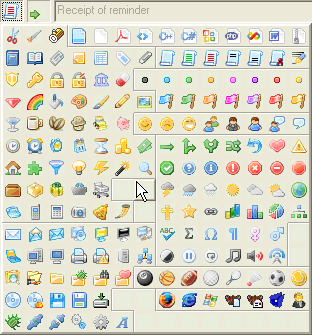
A new version of ReplyButler is out, and it makes the organization of your text modules much easier. Since many version the program did already include icons you could assign to your text modules. Now, these icons are much better organized, into nicer groups. Like all time-related icons next to each other.
That’s how it looks:
Try the free demo.
Posted in Add-In, New Release, ReplyButler | Comments Off on Organizing text modules
December 10th, 2006
By default 1-Click Duplicate Delete for Outlook will only scan the current folder in Oneclick mode. (Hint: In the next release, you’ll also be able to include subfolders).
If you want to scan the entire PST-file for duplicate e-mails (or contacts, etc.) you can use the advanced mode. Or you can use a trick:
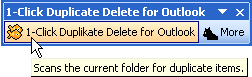
Before you click on the “1-Click…” button, active the “Outlook Today” view in Outlook which is the uppermost folder in the Outlook folder tree. If this view is active, the program scans the entire PST file, including all subfolders for duplicates. If the PST file containts contacts or calendar items, they will be scanned, too.
To get the Test version of 1-Click duplicate delete for Outlook please click here.
Posted in Duplicates, Outlook, Trick | Comments Off on Trick: Removing Outlook Duplicates in the ENTIRE pst file
December 9th, 2006
The title itself shouldn’t be a surprise to anyone, but I just read at golem, that you can get a notebook with a 160GB harddisk for 999. That’s a LOT of data. In fact it’s so much data that you get into a lot of problems if you loose it.
If you have such a lot of files, you should consider making regular backups or synchronize it with you main computer. The latter has the positive side-effect that you have the same data available on both the main PC and the notebook. Very useful. Check out Easy2Sync for Files and Easy2Sync for Outlook.
Posted in News, Sync | Comments Off on News: Notebook harddisks get bigger and bigger.
December 9th, 2006
Yes, I admit, its one if my favourite program. And there’s a new version for ReplyButler out, version 1.23. Most of the changes are internal things, but the recognition of dutch names (with their “te” and “van de” has been improved).
And if you don’t know our perfect Outlook add-in by now, here’s a screenshot:
To get the latest version of the Outlook add-in click here. Or get more information on the Outlook tool here.
Posted in Add-In, Outlook, ReplyButler | Comments Off on New ReplyButler version
December 9th, 2006
It’s not really a topic for my Sync blog, buy hey, it’s weekend. And I’ve release a new Version of GoogleEarthTweaker. It’s a highly specilized program for Geocachers and allows you to mark your foudn caches in GoogleEarth by converting GPX files. Looks like this:
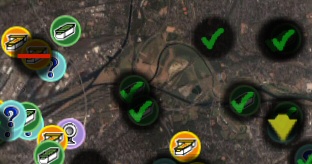
So, if you’re into Geocaching, have a look at the program, it’s free. You can find it here.
Posted in New Release, Off-Topic | Comments Off on Off-Topic: New GoogleEarthTweaker release
December 8th, 2006
Well, not all Outlook users may need a sync software, but we can also offer other interesting programs:
1-Click Duplicate Delete for Outlook
(a program for finding and removing duplicate e-mails, contacts, etc. in Outlook)
ReplyButler
The perfect Outlook add-in for canned texts and power-cllipboard users.
And now you can buy both programs together in the “Outlook Convenience Bundle” and get a great 20% discount. Currently it’s not yet in official price list, blog reader get it first. Click here to get 20% discount.
Posted in Duplicates, Outlook, ReplyButler | Comments Off on New Bundle: Outlook Convenience Bundle
December 6th, 2006
Since many releases Easy2Sync for Outlook contains a function to remove duplicates (to activate it: Right-click the task):
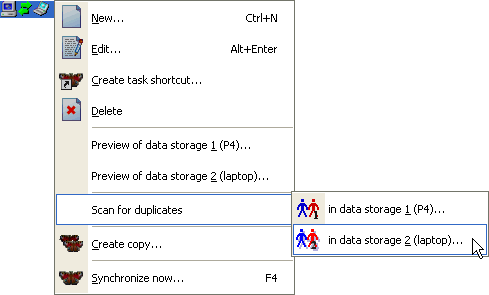
This may seem a bit cumbersome, because you have to create a task first, but keep in mind that Easy2Sync has its focus on synchronization. And that this feature is a free spin-off which is also available in the unregistered version.
If things are a bit more complicated, we can now offer a new product, 1-Click Duplicate Delete for Outlook. It’s lightning-fast, recognizes not only real duplicates but also objects that are “similar”, is integrated into Outlook and offers a convenient “1-Click” mode.
More Info Download
Posted in Duplicates, Trick, Useful | Comments Off on 2 Ways to remove Outlook duplicates
December 6th, 2006
Yeah, deleting objects in Outlook is simple, you’ve done that before.
No, probably you haven’t. You’ve moved items into the recycle bin. That’s a good choice in most cases because you can undo that. In some cases, like very large attachements, duplicates or spam you may want to delete the items permanently.
The trick is quite simple. Don’t use the “Del” key. Use “Shift+Del”. That way the selected items are gone forever. (But please only use that trick if you’re really sure you want to delete that. Please.)
Posted in Duplicates, Outlook, Trick | Comments Off on Trick: Deleting in Outlook
December 5th, 2006
There are all kinds of notebooks, but this idea is (as far as I know) as brilliant as new as it is simple. The new Flybook VM (reported on Golem) is able to hold its display higher and a bit separated from the notebook on some kind of “telescope” arm. (Not really telescope length, but enough to make a difference.)
Notebooks are of course a fascination of mine and I almost did buy one of the previous flybook versions. The Easy2Sync series (to synchronize files and Outlook) were made because I had problems synchronizing my own notebook to take the source code of other programs along…
Posted in Hardware | Comments Off on Giraffe notebook
November 29th, 2006
Do you have too many toolbars in Outlook? Want more space your mails?
You can have that, if you’re willing to sacrifice a few icons that you don’t need, because you can integrated the important icons into Outlook’s main toolbar. It can look like this:

(This sample is taking with icons from 1-Click Duplicate Delete for Outlook. Icons from the program’s toolbar were moved into the main toolbar.)
If you want that, too, perform the following steps:
- Right-Click on an Outlook toolbar and choose “Customize”.
- Hold the Ctrl-Key, click on an icon and drag it into the Outlook main toolbar
- When you’re done with the icons, close the toolbars that you now don’t need any more.
Please note: This works with all Outlook toolbars but not with all toolbars provided by add-ins. Our own duplicate scanner, 1-Click Duplicate Delete for Outlook supports this, as you can see.
Posted in Outlook, Trick | Comments Off on Trick: Making Outlook compacter
