February 2nd, 2008
Another fresh version of Easy2Sync for Outlook is out!

The new version contains several smaller improvements and bug fixes, for example for the new copy-merge mode introduced in the previous version.
Updates are as always free, you can get all info about the software here.
Posted in New Release, Outlook, Sync | Comments Off on Synch your PST files with ES4O 1.27
January 31st, 2008
Are you afraid of the number 13?
Fact is that people avoid this number. You won’t find a row 13 in any plane. And many buildings lack the 13th floor. (Okay, the floor is there, it just has a different number.)
Now version 1.13 is out. We decided not to skip this number. Being a programmer I simply refuse to believe in such superstition.
But anyway: the new version only contains minor changes and was tested really well.
Just in case. 😉
Download 1-Click Duplicate Delete for Outlook.
Posted in Duplicates, New Release, Outlook, Useful | Comments Off on Remove your Outlook duplicates with version 1.13
January 24th, 2008
Synchronzing two calendars is a feature, that’s Easy2Sync for Outlook can do since ages. But the new version 1.26 offers a new twist:
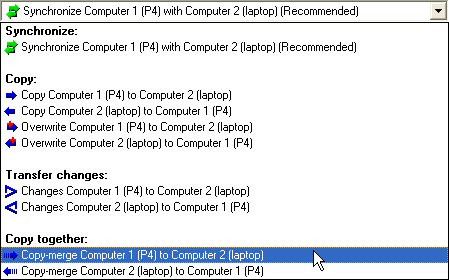
Copy-merging.
Now what’s that?
It almost like synchronizing. Any item that exists on both sides and is changed on either, is updated on the respective other side. The new this: If the item is new, it gets only copied if its new on the “master” side (the source side for the arrow).
Too abstract? Two examples:
1. 20 people in you company have 20 calendars. Simply synchronzing them would create havok, each calendar would contain all items from everybody, you couldn’t find anything. With the new copy-merge mode, you can create a 21st calendar and copy-merge all calendars into the new one. The 20 calendars stay the same but now you have a “team calendar” that contains all items from all calendars. And the best part: If you change an item in the “team calendar” it will get synchronized back to owning calendar *only*.
2. You can 12.000 contacts in Outlook. You PDA would detonate if you tried to synchronize it with that. Just create a calendar with your “favorite contacts”. You can now use your PDA software (sorry, not Easy2Sync) to synchronize your PDA with the favorite contacts folder. And you can use Easy2Sync for Outlook to copy-merge the favorite with the main contact folder. It will synchronize changed items in both directions. But it will not add items from them main to the favorites folder.
Hope you get what I mean. 😉 Want more info on Easy2Sync for Outlook and team calendars? Give Easy2Sync a try!
Posted in Outlook, Sync, Trick | Comments Off on Merging team calendars
January 24th, 2008
Today, we’ve released version 1.03 of our software TheBest Minimize to Tray.

There are little changes, only a minor bugfix for Vista. If you had troubles with the desktop icons, please get the new version.
Posted in Minimize to Tray, New Release | Comments Off on TheBest Minimize to Tray 1.03
January 21st, 2008
Synchronizing Outlook over the network is always the faster and easier option – but it’s not always available. For example if you want to synchronize your Outlook calendar at home and at the office. You still can synchronize them. And here’s how to:
- Get an USB-Stick. It doesn’t have to be big. Any stick that you can buy nowadays is likely to be big enough to hold your calendar. SD-Cards & co work, too.
- Get Easy2Sync for Outlook (this requires the Business Edition). You’ll need it on both computers.
- Use Outlook to create a blank PST file on the USB-Stick (Outlook: File > New > Outlook data file) and create an empty contacts folder in it.
- Close the file in Outlook again. (Right-click the root item of the new file in the Outlook folder tree)
- Start Easy2Sync for Outlook, click on the “New” button and choose the Calendar sync. Just follow the wizard’s steps.
- Repeat (5) on the other PC, with the stick plugged in there.
- If you want, edit the tasks to exclude private contacts from the sync.
That’s all! Want more info on Easy2Sync for Outlook? Click here!
Posted in Outlook, Sync, Trick | Comments Off on How to use your USB-Stick to sync Outlook calendar
January 18th, 2008
Originally Easy2Sync for Files was “just” able to synchronize files. By now it has outgrown that small island and has become a feature continent. You can synchronize, copy, move and do lots of other things with your files. Simply create a new task and choose one of the “move” task types:
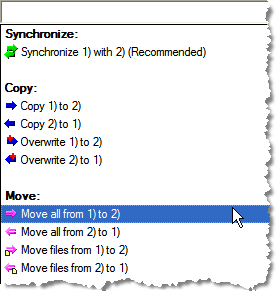
Yes, there’s more than one because you can decide if you want to keep the directory structure or move that, too. Perfect for doing a backup of your files! Try Easy2Sync for Files!
Posted in Files, Sync, Trick | Comments Off on How to move your files
January 8th, 2008
One might argue if collecting stamps is a useful hobby. Collecting tasks however can be VERY useful. Both Easy2Sync for Outlook and Easy2Sync for Files feature something called “task collection” in the “new” menu:
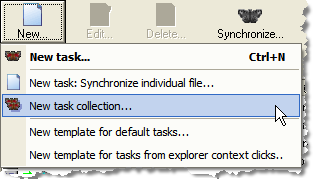
Task collections are special tasks that group several other synchronization tasks. Once the task collection is run (manually or automatically), it starts all the files in the collections. For example, I have a task collection “Backup” that runs all the different backup tasks that I use to back up different parts and projects of my harddisk to a removable medium. One click, one coffee and I can sleep better. 😉
BTW: This feature can be combined with a menu item of the “view” menu. It allows you to hide all the sync jobs that are member of a task collection from the main dialog. A great feature if you have so many sync jobs that it already messes up the main dialog, as it reduces the many synchronization jobs to a few task collections. 😉
Another BTW: You can easily recognize the task collections in the main dialog, as they don’t have an icon to indicate their task type (sync, copy, etc.). Since they can icorporate many task types (sync AND copy) it doesn’t make much sense to display an icon.
If you want you can test the Freeware Edition here.
Posted in Files, Sync, Trick | Comments Off on How to collect sync tasks (instead of stamps)
December 31st, 2007
ReplyButler 1.32 is finally out now.
As announced, the new version includes some great new features: You can assign hotkeys to text modules, text module folders and to all important system functions (like the context dialog).
And you now have a search dialog. Don’t remember where you put the text? Simply run the search dialog from the context menu, type one or more words and you’ll find your boilerplate.
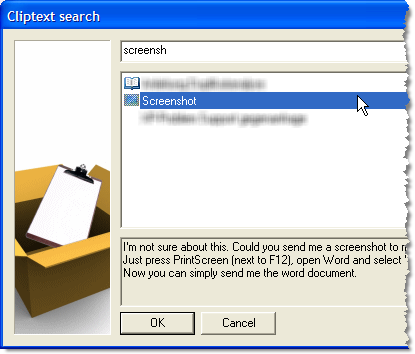
Click here to go to the ReplyButler Homepage.
Posted in Add-In, New Release, Outlook, ReplyButler | Comments Off on ReplyButler 1.32: Hotkeys + Search engine for Text modules
December 31st, 2007
Happy new year and a great 2008!
Posted in Off-Topic | Comments Off on Happy new year!
December 29th, 2007
Yeah, off-topic, I know. But I like my Lifebook and changed the hard disk today and had a hard time finding a how-to for this. Fujitsu-Siemens doesn’t bother to tell you.
So here’s how to.
Before you start:
- Make a backup
- Get some non-magnetized screwdrivers
- Don’t blame me if something goes wrong. This goes without any warrenties. 😉
Step1: Remove the battery and press the power button for a few seconds to remove any remaining energy.
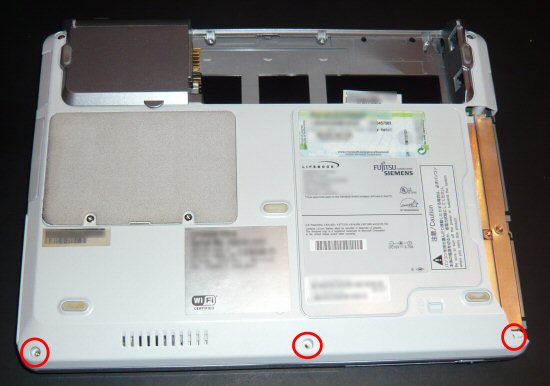
Step2: Turn the Laptop around and remove the 3 screws at the front.
Step3:Turn the notebook around again and carefully pry open the wrist-rest. Don’t pull it away too strong, the touch-pad is still connected with some cables!
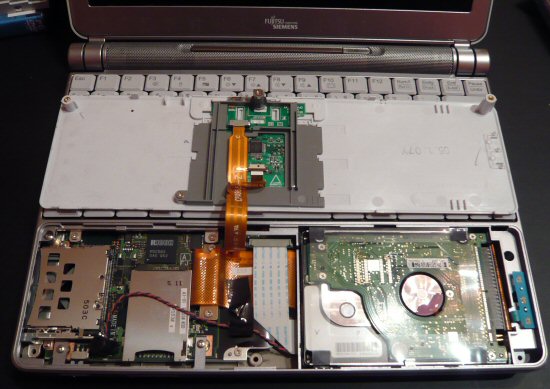
Step4: You can see the harddisk at the front right. It’s only held by the ATA cable. Carefully pull it out and exchange the disk. Don’t damage the HD pins, or you won’t be able to revert back in case of problems.
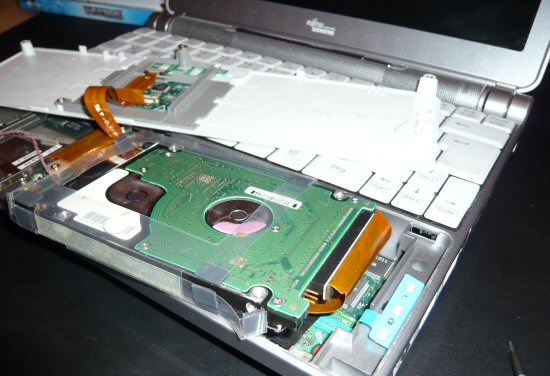
That’s it. Oh by the way: Both Easy2Sync for Files and Easy2Sync for Outlook have “Copy” modes that can be used for a backup. (Not so off-topic after all 😉
Posted in Off-Topic | Comments Off on OT: Exchanging the HDD in a P7010 Lifebook
December 29th, 2007
Version 1.12 of 1-Click-Duplicate-Delete-for-Outlook. The new version has an improved handling for merging contacts that already have been merged by previous runs.
The changes are very intuitivly, the program will include older values (for example for the fax number) after the new one. And several older values if there are already several from previous duplicates scans.
You can get the new version of the Outlook duplicate scanner here.
Posted in Add-In, Duplicates, New Release, Outlook | Comments Off on Merge duplicate contacts – With version 1.12
December 26th, 2007
ReplyButler is on “Bits du jour” today, so you can get the Business Edition for an amazing $19,99! Check their website for the details.
Posted in ReplyButler | Comments Off on ReplyButler today for $19,99
December 24th, 2007
Posted in Off-Topic | Comments Off on Have a merry Christmas!
December 23rd, 2007
Yet another Preview for ReplyButler? Yes, the next release is going to include some big changes.
ReplyButler already includes an automatic search feature in the “Context” menu, that automatically choose text modules that might match the current e-mail. The new release will contain an explicit search menu. Call it from here:

And it looks like this:
Pretty straightforward. Enter one or more search terms and you’ll get a list of text modules that matches them in conditions, headline or text.
It’s not published yet, but you can try the current version (with the context-menu) here: Homepage ReplyButler.
Posted in Add-In, Outlook, Preview, ReplyButler | Comments Off on Preview: Text module search for ReplyButler
December 20th, 2007
A new version of my Freeware tool to convert Geocaching.com GPX files to GoogleEarth KML files (and make the icons look nicer and filter your find and and and) has just gone online.
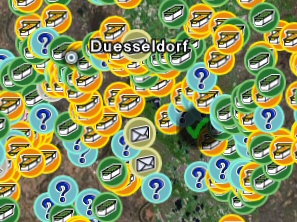
The new release simply fixes a bug that could happen with coordinates that have only zeros after the degree sign.
You can find GoogleEarthTweaker on the Download page.
Posted in Free, New Release, Off-Topic | Comments Off on GoogleEarthTweaker 1.08
