August 12th, 2007
Outlook is a great e-mail client, but shorthand text modules are not its strong suit. Some people suggest to use text expansion macros, but remembering them isn’t easy either, especially if you have a lot of text modules. (Most people who work in software support do.)
ReplyButler, can not only answer your e-mails with the right name, it also stores text modules. For this, it includes a new dialog bar, where you can see your text modules in a menu structure. Simply Ctrl+Click any of these items to add a new text module. (Or just click it to access the menu structure of your boilerplate texts.)
ReplyButler also allows language-specific text modules, variables, etc. But, then, that will be blogged on a different day. 😉
Please click here to try ReplyButler’s text moules in Outlook.
Posted in Add-In, Outlook, ReplyButler, Trick | Comments Off on How to use text modules in Outlook
August 10th, 2007
Yes, version 1.29 is out and brings some improvements and bug fixes. It’s amazing how many detatils there are to consider and what variaty of things people write into the field where their name should go (making the work for ReplyButler difficult).
So, the name and language recognition where improved in this release once again to give you the perfect help desk experience. If YOU encounter one of these problem e-mails when doing your e-mail support with ReplyButler, please drop us a line and include the problem e-mail and we’ll get YOUR special case fixed, too. 🙂
Posted in Add-In, New Release, Outlook, ReplyButler | Comments Off on New Version of our e-mail helpdesk tool
July 23rd, 2007
The changes in the recent versions have mostly been details. In the next release, Easy2Sync will contain some bigger changes. One is the new request dialog which will display the facts clearer.
And nicer. 🙂
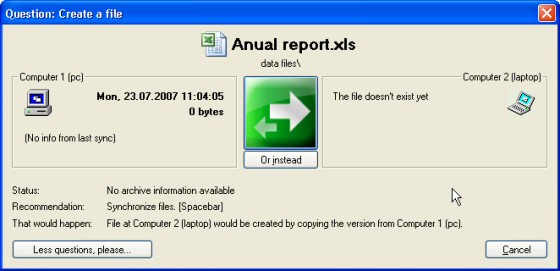
The new version isn’t available online yet, but if want to synchronize your files, please try the current version.
Posted in Files, Preview, Sync | Comments Off on Preview: Easy2Sync for Files
July 19th, 2007
Keep your Outlook E-Mails, contacts, calendar items etc. in sync on multiple PCs with the new version of Easy2Sync for Outlook. If you’re using Outlook and multiple PCs (Desktop and notebook), then Easy2Sync is just what you need. 😉
The new version has an improved sync overview dialog and password support for Exchange servers.
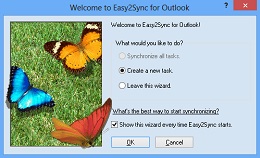
Download our Outlook Sync program!
Posted in New Release, Outlook, Sync | Comments Off on New Release: Easy2Sync for Outlook 1.24
July 17th, 2007
(This artcle was previously published in the ASPects regarding ReplyButler, but now I’ll make it available to everyone.)
CHOOSING THE RIGHT PRODUCT
Did I catch you? Great, here are a few things you should consider when choosing the right boilerplate software for you.
1. Subfolders (Multiple levels)
These are absolutely essential if you want to stay organized.
2. General or integrated
If you plan to use boilerplate only in your e-mails you might want to look for a product that can be integrated into your mail client, making the texts easier to access. If you want to use it in other places, too (software development perhaps?), you should use a program than can cooperate with all applications on your PC.
3. Multi-Language
If you speak more than one language and answer support mails in the other language(s) you’ll find it useful to have your boilerplate text in multiple languages.
4. Multi-User
If your company is not a one-man-show, you’ll probably want to share your canned text with other persons. You could probably just copy the configuration files around, but it would be easier if the program supports a multi-user environment from the start.
5. Icons
You’ll probably look down on this point. But I’ve found it very useful because it’s easier to memorize an image than a text.
Good luck with your boilerplate!
Thomas Holz is the owner of www.itsth.com, a company offering the “Easy2Sync” file- and Outlook synchronization tools as well as the boilerplate software for Outlook “ReplyButler“.
Posted in Free, Outlook, ReplyButler, Trick | Comments Off on Free Article: Boilerplate Text in Software Support (3/3)
July 12th, 2007
One-click Duplicate Delete for Outlook contains a neat option that can easily be overlooked, because it’s tiny (but also very powerful):
It can find duplicates that are not in the same folders.
To enable it, just use the advanced scan mode and activate the corresponding option:

That’s all. Have try, Download 1-Click Duplicate Delete for Outlook.
Posted in Duplicates, Outlook, Trick | Comments Off on Duplicates in different folders
July 9th, 2007
(This artcle was previously published in the ASPects regarding ReplyButler, but now I’ll make it available to everyone.)
ADVANCED BOILERPLATE ISSUES
If the boilerplates really become useful for you and your collection grows, you’ll face a different problem. Finding a text you’ve written months ago. That’s why you have to organize and maintain your texts. Giving the texts short headlines is essential and folders are very handy, too.
If you do support in multiple languages, you’ll probably want to use the same text in these languages, too. This can be difficult with most boilerplate products, as they don’t support it. As a workaround you can use folders or prefixes (or postfixes) with the language name in the headline (like “EN – Install problem”). But it’s important to use the same headline for the same issue, no matter what language the response is in. Otherwise you’ll constantly look for the wrong text. (Another mistake that I already made.)
The English language isn t very picky when it comes to addressing a person, but other languages offer more choices than simply “you”. Depending on your language and communication policies you may even want to store the same text in different styles: formal and informal. Otherwise you might easily end up with addressing somebody with his last name in the greeting phrase and using an informal addressing (“tu” in Spanish, for example) in the boilerplate. Sometimes texts are basically the same for several products or vary in other minor issues. So it makes sense to use one single boilerplate here and just fill in the gap when you re inserting the text.
Some boilerplate programs can ask for the gap text. If yours doesn t, simply use a placeholder like ######. The hash marks are great because you can very easily see them and it s less likely that you send out a mail where you didn t fill in the gap.
Posted in Free, Outlook, ReplyButler, Trick | Comments Off on Free Article: Boilerplate Text in Software Support (2/3)
July 8th, 2007
Our Company Logo Designer already has a lot of templates (the Comfort Edition a whopping 250), but here are some more. This week, we can offer you free, elegant logo templates.
You can get this free logo pack “Elegant logos” here.
Here are some logo samples:



Posted in Company Logo Designer, Free, Useful | Comments Off on Freebee of the week: Elegant Logo Pack
July 4th, 2007
(This artcle was previously published in the ASPects regarding ReplyButler, but now I’ll make it available to everyone.)
They have many names. The dictionary calls them boilerplate text, but you ll also find them as stationery, AutoText, templates, canned text or text macros. The idea is always the same: Type a text once-use it many times. This article is about why they are useful for software support and how to get the most out of them.
Customers are asking questions. And chances are that they’ll ask you the same questions over and over again (probably ignoring any FAQ). And you’re typing the same answers again and again. You don’t? Sure? Test it! For the next twenty answered mails, pause for a second and think if you didn’t write that answer (complete or in parts) before. You’ll see that it happens more often than you thought. Still, you probably refrain from storing these texts in some form, because of the extra work this causes. Organizing the texts, choosing a wording that can easily be reused later for another customer, etc. But this work quickly pays off; you just have to start it. And the more boilerplate replies you have ready, the more time you can save, you’ll see.
As a side-effect, you ll probably also deliver the answers to customers quicker than you used to. Since canned text makes answering e-mail easier, you re less likely to procrastinate the answers.
Boilerplate has another advantage. Customers sometimes are unfriendly or simply write stupid things. It’s tempting to let your feeling go wild and write a hefty response. That may be satisfying for the moment, but it will definitely backfire. Trust me, I already made that mistake. If you have a boilerplate response to handle the customer’s issue (written in a friendly tone) it’s much easier to give the customer a professional reply.
Furthermore, a boilerplate library makes it easier for other persons to do your support work. Either while you’re on holiday or if you permanently give the support job to somebody else. This way they have to know less about your products and your company policies because they can just use pre-written texts.
Creating and using your boilerplate forces you to organize and categorize your support cases. This will also make it easier for you to see what the typical questions are that the people keep asking. That s very valuable knowledge. Perhaps you can change your product or website to make these issues clearer even before the customer has to write you an e-mail?
Posted in Free, ReplyButler, Trick | Comments Off on Free Article: Boilerplate Text in Software Support (1/3)
July 1st, 2007
Designing logos with the Company Logo Designer software is easy, but even it is even easier if you have a nice logo template to start with.
And this week we have a pack of 25 free templates for Company Logos. Here are some samples:



They’re free, they don’t even require the paid version. Download the Company Logo templates.
Posted in Company Logo Designer, Free, Useful | Comments Off on Freebee of the week: Free Company Logo templates
June 26th, 2007
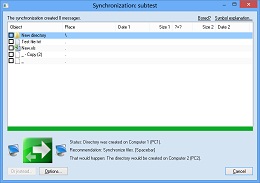
When you want to synchronize your files, Easy2Sync should be your first choice. And the new releases files some final details for Vista compatibility to make everything run smoothly.
So, give it a a try and download the latest version. 😉
Posted in Files, New Release | Comments Off on New Version: Easy2Sync for Files 1.22
June 19th, 2007
Organizing your canned texts for more efficient e-mail handling is great, but when you have lots of text, finding the right one can be a problem. (Even if you use the ReplyButler feature of organizing them in folders.)
For this problem ReplyButler has a great feature: The “Context” menu!
That is a new menu item that you will see your answer window in Outlook. Click on it and ReplyButler will display a lists of canned texts that could be useful to answer the current mail:

Automatically.
It’s great, have a try.
Posted in ReplyButler, Trick | Comments Off on Organizing your recorded texts for faster typing
June 16th, 2007
One-click duplicates for Outlook contains a neat option that can easily be overlooked, because it’s tiny (but also very powerful). It can find duplicates that are not in the same folders. To enable it, just use the advanced scan mode and activate the corresponding option:

Want to try? Get the demo here.
Posted in Duplicates, Outlook, Trick | Comments Off on Duplicates in different folders
June 14th, 2007
Easy2Sync for Outlook has a neat user interface which is just great for most of us. But sometimes, you want to use batches or links. And for these occasion you can also run the sync from command line with parameters.
Our sync program for Outlook offers a lot of things to tweak here:
/SyncAllAndExit
/SyncAll
/SyncAndExit:MyTasktName
/Sync:MyTaskName
/FromAutostart
/IgnoreNetworkError
/NoSplash
/RunOutlookAfterClose
/Delayed
/Delayed:n
I won’t go into details here, most things explain themselves here, I think. If you’re interested, just run the program and press F1, there’s a link to the details in the programs help. (If you want to download the Freeware Edition, click here.)
Posted in Outlook, Sync, Trick | Comments Off on Trick: Command line sync for Outlook
June 12th, 2007
Yes, another version is out (1.28).
ReplyButler, our keyboard program. (Which just shorthand for Outlook-plugin-canned-text-storage-email-answerer-with-name-recognition-and-automatic-text-replacement-context. Now you know why we prefer the short name.)
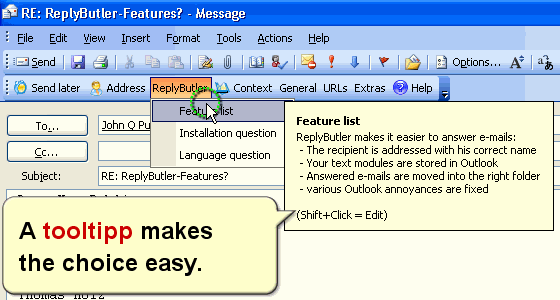
Since the program has evolved very nicely, the changes are mostly details and bug fixes. For example the e-mail moving dialog now remembers the last folders you had the e-mail sorted it. (Automatic mail sorting feature)
So, it’s even better now and we have a free version: Why not download it for your Outlook?
Posted in New Release, ReplyButler, Useful | Comments Off on ReplyButler 1.28 – Best keyboard program ever ;-)
