January 13th, 2007
Yes, version 1.05 is out.
And well, there isn’t much to report. The program works simply this great that we only had to fix details. So, no big news, it worked great and it still works great.
Try it for free!
Posted in Duplicates, New Release, Outlook | Comments Off on New Duplicate Delete for Outlook Release
January 13th, 2007
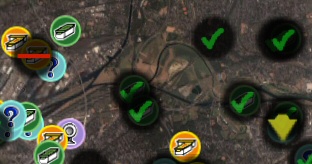
If you’re into Geocaching, you might be interested in GoogleEarthTweaker, a Freeware program that I wrote. It allows you to convert GPX files (pocket queries) into nicer KML files with nicer icons. To do that, simply drag the GPX file (or the zipped GPX file) into the main dialog of GoogleEarthTweaker.
There are however some tricks:
- You can choose the icon types. Leave them as their normal cache icons by default or use other special icon types for special pocket queries. For example red bars for disabled caches or green checkmarks for caches that you found.
- If you want things automated, you can also use a batch mode. Simply drag a GPX file onto the executable file to see the details.
- If you have many GPX files, there will be quite a mess with the GPX/KML file mix in your Windows explorer. So, simply create a subdirectory with the name “To GoogleEarth”. If GoogleEarthTweaker detects that directory it will store the created KML files not in the directory where the GPX file came from, but in that subdirectory. Then, to import the files into GoogleEarth, simply go to that subdirectory, select all the files here and drag them in the GoogleEarth window.
Try it!
Posted in Free, Off-Topic | Comments Off on How to use GoogleEarthTweaker
January 12th, 2007
With the options you can turn off all questions and dialogs. And there’s even one thing that can be done more convenient if you like. The start.
If you want to start the sync manually, you can create a shortcut to the task on your desktop. Just right-click the task in the main dialog to create such a shortcut. Double-clicking the shortcut will run the sync and synchronize your files.
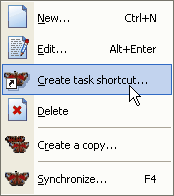
Of course you can move the link to a different folder if you prefer, like the Windows start menu to run your sync task from there.
Posted in Files, Sync, Trick | Comments Off on One-click file Synchronization
January 12th, 2007
yes, a new version of the popular file sync tool is out.
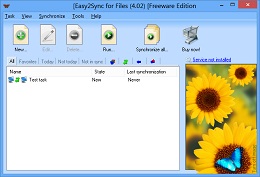
It’s hard to make great things better, so we’re working on the details by now:
- A completely automatic sync on system shutdown
- An automatic backup of the configuration
- An exit button in the tray menu
- …
You can get the latest version here.
Posted in Files, New Release, Sync, Useful | Comments Off on Easy2Sync for Files – Version 1.19 is out
January 10th, 2007
At Christmas, New Year and several other times of the year, we use special greeting phrases in our lives. And ReplyButler can use them, too. Automatically wishing the people “Merry Christmas” is very easy:
- Open the ReplyButler Options (Extra / Options)
- Go to the “My answer” Tab
- Click on the Button “…” that is between the 2 combo boxes at the top
If you want to add Christmas or New Year greetings, simply use pre-defined menu-item for that and confirm the next dialog. Now you’ve got a next “special case” in the left combo box. Choose here the Christmas case and you can edit the phrases that you want to use here.
If you want to defined your own special case, for example a special greeting phrase in the evening, use the “…” and add a “user-defined” case with a nice name and the right conditions (here: the time). Then, while this special case is active, just enter the phrases that you want to use. Leave the edit boxed empty to use the default values from the “special case default”.
Posted in Outlook, ReplyButler, Trick | Comments Off on Reply with seasonal greetings in your e-mail
January 9th, 2007
Rotating directories are used when you use one of the following placeholders in a path (preferably the target directory for the Copy / Overwrite operations):
- %HOUR%, %HOUR2%: Current hour, normal (0-23) / with leading 0 (00-23)
- %DAY%, %DAY2%: Current hour, normal (1-31) / with leading 0 (01-31)
- %WDAY_GER%, %WDAY_ENG%: Current weekday, German / English, complete word
- %WDAY_GER2%, %WDAY_ENG2%: Current weekday, German / English, 2 letters
- %MONTH%, %MONTH2%: Current month, normal (1-12) / with leading 0 (01-12)
- %MONTH_GER%, %MONTH_ENG%: Current month, German / English, complete word
- %MONTH_GER3%, %MONTH_ENG3%: Current month, German / English, 3 letters
Furthermore you can use a placeholder for time-independent rotation by using 2 characters, separated by a dash and enclosed by percent signs. Examples:
%1-3%
%A-F%
For each synchronization Easy2Sync “jumps” to the next value.

Posted in Files, Sync, Trick | Comments Off on Creating a rotating Backup for your files (2/3)
January 8th, 2007
Word? No, I use Outlook. That’s what some people say, not knowing that they DO use Word to edit their e-mails And how can they know? It’s nearly invisible in Outlook! Here’s how:
- In the Outlook main window choose Tools / Options.
- Go to page “Mail Format”.
- Here you can see the option “Word as Editor”.
If you want to use ReplyButler you have to deactivate Word here, sorry. And personally I think that’s better anyway. Because otherwise you may be affected by potential Word security issues just by reading your e-mails…
Posted in Add-In, ReplyButler, Trick | Comments Off on How to find out if you’re using Word as e-mail editor
January 6th, 2007
A so-called “rotating backup” creates copies in changing target directories. This way you always have several versions and thus more security.
You can use Easy2Sync to create rotating backups. But you should note a few things.
- All base directories that are used by the rotation must already exist. Easy2Sync will not create them. (Easy2Sync will of course create subdirectories as usual, but not the base directories.)
- Only the task types “Copy” and “Overwrite” are supported, but not the task type “Synchonize”.
Please note:
The warning level may change. For example, a normal file deletion can result in a warning for an asynchronous file delete. Since these warnings were designed for the task type “Synchronizing”, it is not really a problem and the correct actions will be performed anyway.
The reason for this behavior is the way that rotating backups were implemented. Easy2Sync stores the last known state for the every file, but does not keep an extra version for each rotating directory. If a file was deleted (in both directories) and then the rotation kicks in, it looks (from Easy2Sync’s perspective) as if the file suddenly reappeared. As stated above: This changes the warning level, but the correct action will be taken anyway.
Try it and download Easy2Sync for Files now.
Posted in Files, Sync, Trick | Comments Off on Creating a rotating Backup for your files (1/3)
January 4th, 2007
ReplyButler can store canned texts, which is great for support work. If you have many texts, you can manually train it to find the right text for you.
By default the software tries to learn when a canned text fits from the e-mails that you insert it into, but you can also manually specify keywords. To do that, edit the canned text and go to the second tab. Here you can edit keywords and choose relevancy criteria.
Example: You have a price list that you send customers who are asking for it. Then enter the keywords “price”, “prices” and “pricelist” and tell the software that this canned text is relevant if any of these words occur in the e-mail. Next time that you get an e-mail questioning for prices, don’t search the menus for your text. Just open the context menu -there it is.
Give it a try and download ReplyButler now.
Posted in Add-In, Outlook, ReplyButler, Trick | Comments Off on Doing support with canned texts III
January 2nd, 2007
Golem has reported a new notebook prototype from Samsung that works with a fuel cell that works for 15 hours (or one month in a large version). Finally a real step to being really independend with your notebook..
Posted in News | Comments Off on Being really mobile
December 31st, 2006
Hope you had a great 2006. 🙂
Posted in Off-Topic | Comments Off on Happy new year!
December 29th, 2006
There are characters in other languages (like greek, east europe or asia) that I can’t even type here. Really strange looking things. But even when I’m totally lost with these strange things, Easy2Sync for Files isn’t.

Simply open the options, go to the”Other” tab and activate Unicode support. That’s all, Easy2Sync will now be able to handle even the strangest characters.
Posted in Files, Sync, Trick | Comments Off on Synchronizing Unicode files
December 27th, 2006
ReplyButler can store canned texts, which is great for support work. But if you’re really into this and your text collection grows, it will get difficult for you to find the right text.
The solution? Use folders!
ReplyButler supports folders that contain the canned texts or even other folders. This allows you to organize your texts into nice groups with speaking names. You can even assign each text 2 icons. One normal icon (like an image of an e-mail) and an overlay icon (like a yellow exclamation mark). Both icons are displayed together as one when you look at the menu with the clip texts.
Posted in Add-In, Outlook, ReplyButler, Trick | Comments Off on Doing support with canned texts II
December 24th, 2006
No words required, I think… 😉
Posted in Off-Topic | Comments Off on Happy Christmas!!!!
December 22nd, 2006
It’s important to have a backup of you current data. And it’s important that it’s easy to create, otherwise you won’t do it regularly. That’s why Easy2Sync for Files is a great tool for this (yes, I use it personally for this task).
The software allows you to automate the backup process 100%, without asking any questions. You can collect data from many folders. Ignore folders or file types that you don’t need for your backup. And you can even create rotating backups (for every day of the week, of the month or simply the last 3 versions).
To use Easy2Sync for making a backup of your data, please choose the task type “Copy” or “Overwrite”. You can change the task type in the first page of the task properties.
Posted in Files, Trick | Comments Off on Doing your backup with Easy2Sync for Files
