Archive for the ‘Outlook’ Category

Trick: Synchronize your Text modules with Easy2Sync

Wednesday, October 10th, 2007

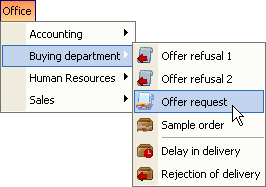
Our software ReplyButler is able to store (very complex) text modules in form of text module library. Each library equals a file on your harddisk.
Canned texts

If you’re using ReplyButler in a team environment you may know that you can store the library files on a network drive. ReplyButler can handle this and share access between the instances running.

But what if you’re using a laptop that’s not always connected to the network? No problem you can use your Outlook text modules there, too. Simply use Easy2Sync for Files to synchronize the .ClipTextLib files between the computers. If you all of your text module libraries are stored in the same folder on your harddisk (would be a good idea anyway), then even the Freeware Edition of Easy2Sync for Files can do this.

New Outlook sync software Release: 1.25

Monday, October 1st, 2007

Happy Birthday, Easy2Sync for Outlook got another release older. 😉

The new version brings a new feature, that you may already know from Easy2Sync for Files. If you’re synchronizing a PST files that’s stored on an USB drive then the drive letter can become a problem. Will can change the drive letter for device when you re-plug it.

Because the sync of an USB device is an important issue we’ve added support for this long ago. But specifying the right parameters wasn’t really easy. We changed that. Now simply enter the path. Easy2Sync for Outlook will recognize the USB status and suggest the right things.

Give it a try and synchronize your Outlook e-mails.

New screenshots of our Canned Text Software

Thursday, September 27th, 2007

So far, our canned text software for Outlook, ReplyButler, was represented by a demo video and some images in the blog. Time for an improvent, so we added a nice screenshot gallery.

Now there are 20 screenshots showing the options, the menu, the text module dialog and the canned text library.

Here’s a sample:

Screenshot replybutler

To see more, please visit the Screenshot pages.

Synchronizing private contacts

Monday, September 24th, 2007

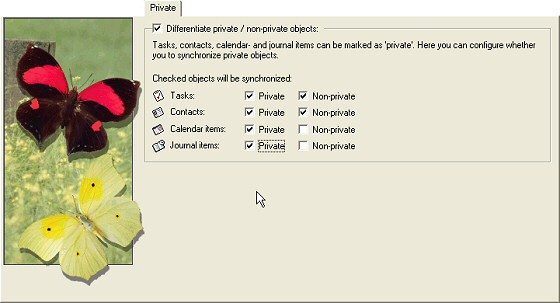
Outlook supports a “private” flag for contacts, calendar items and other items. Depending on your situation you might want to synchronize only private or non-private items. Or both?

No matter which combination you want, Easy2Sync for Outlook supports it. You can simply decide (for each object type indepently) if you want to synchronize or not. Transfer non-private contacts? Or only the private calendar items? Anything goes.

See for yourself:
Sync private Outlook contacts

Click here to try it and download the Freeware Edition.

How to use text modules in Outlook

Sunday, August 12th, 2007

Outlook is a great e-mail client, but shorthand text modules are not its strong suit. Some people suggest to use text expansion macros, but remembering them isn’t easy either, especially if you have a lot of text modules. (Most people who work in software support do.)

ReplyButler, can not only answer your e-mails with the right name, it also stores text modules. For this, it includes a new dialog bar, where you can see your text modules in a menu structure. Simply Ctrl+Click any of these items to add a new text module. (Or just click it to access the menu structure of your boilerplate texts.)

ReplyButler also allows language-specific text modules, variables, etc. But, then, that will be blogged on a different day. 😉

Please click here to try ReplyButler’s text moules in Outlook.

New Version of our e-mail helpdesk tool

Friday, August 10th, 2007

Yes, version 1.29 is out and brings some improvements and bug fixes. It’s amazing how many detatils there are to consider and what variaty of things people write into the field where their name should go (making the work for ReplyButler difficult).

So, the name and language recognition where improved in this release once again to give you the perfect help desk experience. If YOU encounter one of these problem e-mails when doing your e-mail support with ReplyButler, please drop us a line and include the problem e-mail and we’ll get YOUR special case fixed, too. 🙂

New Release: Easy2Sync for Outlook 1.24

Thursday, July 19th, 2007

Keep your Outlook E-Mails, contacts, calendar items etc. in sync on multiple PCs with the new version of Easy2Sync for Outlook. If you’re using Outlook and multiple PCs (Desktop and notebook), then Easy2Sync is just what you need. 😉

The new version has an improved sync overview dialog and password support for Exchange servers.

Outlook sync

Download our Outlook Sync program!

Free Article: Boilerplate Text in Software Support (3/3)

Tuesday, July 17th, 2007

(This artcle was previously published in the ASPects regarding ReplyButler, but now I’ll make it available to everyone.)

CHOOSING THE RIGHT PRODUCT

Did I catch you? Great, here are a few things you should consider when choosing the right boilerplate software for you.

1. Subfolders (Multiple levels)
These are absolutely essential if you want to stay organized.

2. General or integrated
If you plan to use boilerplate only in your e-mails you might want to look for a product that can be integrated into your mail client, making the texts easier to access. If you want to use it in other places, too (software development perhaps?), you should use a program than can cooperate with all applications on your PC.

3. Multi-Language
If you speak more than one language and answer support mails in the other language(s) you’ll find it useful to have your boilerplate text in multiple languages.

4. Multi-User
If your company is not a one-man-show, you’ll probably want to share your canned text with other persons. You could probably just copy the configuration files around, but it would be easier if the program supports a multi-user environment from the start.

5. Icons
You’ll probably look down on this point. But I’ve found it very useful because it’s easier to memorize an image than a text.

Good luck with your boilerplate!

Thomas Holz is the owner of www.itsth.com, a company offering the “Easy2Sync” file- and Outlook synchronization tools as well as the boilerplate software for Outlook “ReplyButler“.

Duplicates in different folders

Thursday, July 12th, 2007

One-click Duplicate Delete for Outlook contains a neat option that can easily be overlooked, because it’s tiny (but also very powerful):

It can find duplicates that are not in the same folders.

To enable it, just use the advanced scan mode and activate the corresponding option:

Outlook dupes

That’s all. Have try, Download 1-Click Duplicate Delete for Outlook.

Free Article: Boilerplate Text in Software Support (2/3)

Monday, July 9th, 2007

(This artcle was previously published in the ASPects regarding ReplyButler, but now I’ll make it available to everyone.)

ADVANCED BOILERPLATE ISSUES

If the boilerplates really become useful for you and your collection grows, you’ll face a different problem. Finding a text you’ve written months ago. That’s why you have to organize and maintain your texts. Giving the texts short headlines is essential and folders are very handy, too.

If you do support in multiple languages, you’ll probably want to use the same text in these languages, too. This can be difficult with most boilerplate products, as they don’t support it. As a workaround you can use folders or prefixes (or postfixes) with the language name in the headline (like “EN – Install problem”). But it’s important to use the same headline for the same issue, no matter what language the response is in. Otherwise you’ll constantly look for the wrong text. (Another mistake that I already made.)

The English language isn t very picky when it comes to addressing a person, but other languages offer more choices than simply “you”. Depending on your language and communication policies you may even want to store the same text in different styles: formal and informal. Otherwise you might easily end up with addressing somebody with his last name in the greeting phrase and using an informal addressing (“tu” in Spanish, for example) in the boilerplate. Sometimes texts are basically the same for several products or vary in other minor issues. So it makes sense to use one single boilerplate here and just fill in the gap when you re inserting the text.

Some boilerplate programs can ask for the gap text. If yours doesn t, simply use a placeholder like ######. The hash marks are great because you can very easily see them and it s less likely that you send out a mail where you didn t fill in the gap.

Duplicates in different folders

Saturday, June 16th, 2007

One-click duplicates for Outlook contains a neat option that can easily be overlooked, because it’s tiny (but also very powerful). It can find duplicates that are not in the same folders. To enable it, just use the advanced scan mode and activate the corresponding option:
Outlook duplicate removal

Want to try? Get the demo here.

Trick: Command line sync for Outlook

Thursday, June 14th, 2007

Easy2Sync for Outlook has a neat user interface which is just great for most of us. But sometimes, you want to use batches or links. And for these occasion you can also run the sync from command line with parameters.

Our sync program for Outlook offers a lot of things to tweak here:

/SyncAllAndExit
/SyncAll
/SyncAndExit:MyTasktName
/Sync:MyTaskName
/FromAutostart
/IgnoreNetworkError
/NoSplash
/RunOutlookAfterClose
/Delayed
/Delayed:n

I won’t go into details here, most things explain themselves here, I think. If you’re interested, just run the program and press F1, there’s a link to the details in the programs help. (If you want to download the Freeware Edition, click here.)

Easy2Sync for Outlook 1.23 is out!

Friday, June 8th, 2007

Another day, another release. Version 1.22 didn’t last very long because we had the wrong language in the assistant. That’s fixed now, our apologies for any inconvenience caused.

The new release also fixes a minor problem with configuration under Windows 98 (when working with diskettes.)

Do you want to try Easy2Sync for Outlook? You can download the Freeware Edition here.

Synch Outlook

Trick: Simple phrase recording with ReplyButler

Wednesday, June 6th, 2007

It pays off to record your typical phrases in e-mails and store these canned texts to reuse them later (like in a macro key recorder). And there’s a trick in ReplyButler to make this very easy.

Simply type your e-mails as usual. (Note ReplyButler requires Microsoft Outlook as e-mail client.) When you’ve written the text and it strikes you that you might want to re-use a part of it later, simply:

  • Select that part
  • In ReplyButler: Choose “Extras” / “Generate cliptext from selection”

And that’s it. Our keyboard tool “ReplyButler” will create a ClipText for you and ask for the folder to store it in.

Give it a try:

Canned text storageDownload ReplyButler

Simple Outlook Helpdesk System: ReplyButler

Tuesday, May 29th, 2007

Ever tried doing support work. At least for smaller companies the huge help desk programs are quite cumbersome to handle and install.

But ReplyButler is an easy alternative. The unique program can store your canned texts, suggest matching answers for the customers e-mails and also moves the answered e-mails into the right folders. Basically, all the things you need for a small helpdesk.

And when your company grows, no problem. ReplyButler can even share its text blocks, so that multiple Outlooks can access your prewritten text blocks.

Try it and get ReplyButler now.